TL;DR
- Why convert: cleaner, portable content for CMS / LLMs.
- Flow: fetch the page with Scrapingdog and get
Markdownin one go via a simple flag; tiny Python script. - Setup: install
Python+requests; run the sample to outputMarkdown. - Includes 1,000 free credits to try.
Developers often need to extract clean, structured content from web pages. While HTML is powerful for rendering, it can be messy and full of boilerplate when you’re just looking for the main text content. A more lightweight format like Markdown makes the data portable, readable, and easy to repurpose in blogs, notes, or static site generators.
In this guide, we’ll walk through how to scrape a web page as HTML using Scrapingdog’s General Scraper API and then convert that HTML into Markdown with just a few lines of code.
Why convert HTML to markdown?
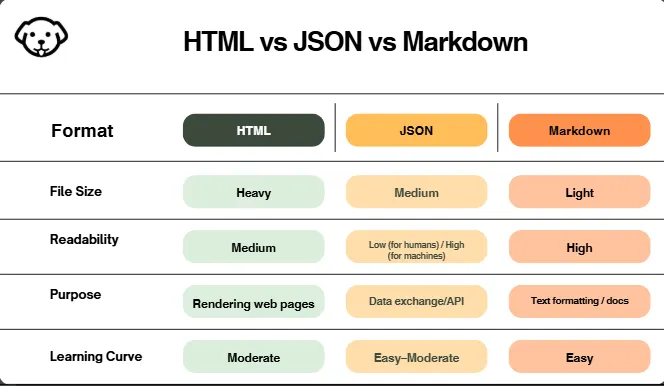
- Readability → Markdown is clean and human-friendly.
- Content Reuse → Ideal for importing into CMSs, note-taking tools, or static site builders.
- Lightweight Storage → Smaller file sizes without inline CSS/JS clutter.
- Developer Friendly → Easy to version control and process further.
Requirements
- Start by creating a folder by any name you like. Python should be installed on your machine.
- Install the
requests library inside this folder. This will help us in making HTTP requests to the target website. You can install it via the commandpip install requests. - Create a Python file by any name you like. I am naming the file as
mark.py. - Now sign up for the free pack of Scrapingdog. You will get 1000 credits for free.
Get Raw HTML With Scrapingdog Web Scraping API
Before we start with scraping, it is advisable to read the documentation. For this tutorial, we will scrape the Amazon page. Scrapingdog’s General Scraper API handles all the messy parts of scraping for you — rotating proxies, CAPTCHA, headless browsers, so you just get the raw HTML without getting blocked.
					import requests

API_KEY = "your-api-key"
url = "https://www.amazon.com/dp/B00DFO3C2G"

response = requests.get(
    "https://api.scrapingdog.com/scrape",
    params={
        "api_key": API_KEY,
        "url": url,
        "dynamic":"false",
        "markdown":"true"
    }
)

print(response.text)
Let me explain this code.
- First, we imported the
requestslibrary. - Then we declared the API key and the target URL.
- Finally, we are making the GET request to the scrape endpoint of Scrapingdog.
- We are passing a few parameters, such as
dynamic,url,api_key, andmarkdown. Here,markdownwill help us convert the scraped raw HTML to markdown format.
Let’s run the script and check the output. You can do this by opening your terminal (cmd or bash) and running: python mark.py.
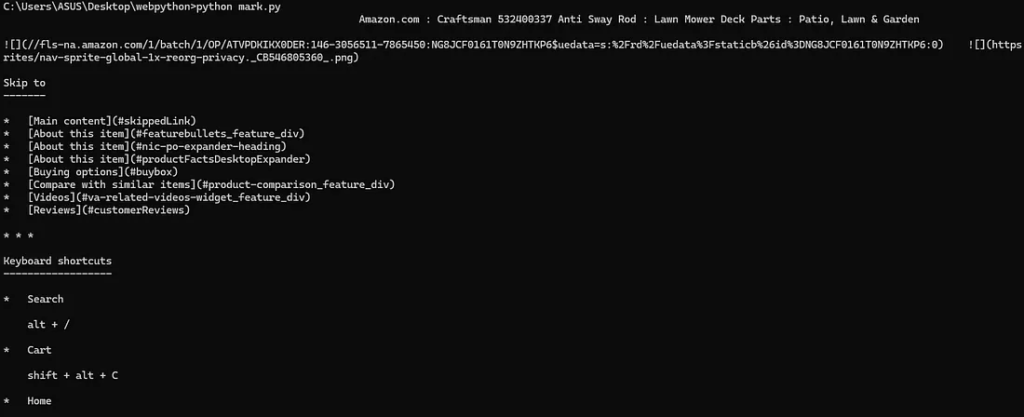
We got clean markdown data, and now you can feed this data to any LLM model.
Here are 5 Key Takeaways:
- Shows methods to convert HTML content into Markdown format.
- Demonstrates using tools or libraries that automate HTML-to-Markdown conversion.
- Provides example code (e.g., Python or JavaScript) for practical implementation.
- Highlights use cases like documentation, static site generation, and content migration.
- Covers handling common HTML elements and preserving structure during conversion.
Conclusion
Converting HTML into Markdown is a simple but powerful way to make web content more portable, lightweight, and developer-friendly. With just a few lines of code, you can strip away the clutter of styles and scripts, leaving behind a clean document ready to use in your projects.
Whether you’re archiving articles, migrating content into a CMS, or preparing text for analysis, combining a scraper to collect raw HTML with a converter library gives you a flexible workflow. Markdown keeps things readable, easy to edit, and future-proof for almost any use case.
We also have a free tool to convert URL to Markdown, in case you want to convert few URLs in this format.
Additional Resources
Here are some extra resources that you might find useful during your web scraping journey: –