TL;DR
- Learn how to scrape Google Shopping using Python and export results to CSV.
- Use Scrapingdog's Google Shopping API to extract product titles, prices, ratings, reviews, merchants, and images without dealing with proxies or CAPTCHAs.
- Parse the JSON response with
RequestsandPandas, then calculate discounts and save the data to CSV. - Use pagination, country targeting, and the Google Immersive Product API for richer product details.
Google Shopping aggregates product listings, prices, ratings, and seller data from thousands of retailers, making it one of the most valuable sources for price monitoring, market research, and competitive intelligence.
In this tutorial, you’ll learn how to scrape Google Shopping results using Python and Scrapingdog’s Google Shopping API. By the end, you’ll have a working script that extracts product titles, prices, ratings, reviews, and source URLs, and exports everything to a CSV file.
If you’re looking to scrape general Google search results instead, see our guide on scraping Google search results with Python.
Why Is Google Shopping Difficult to Scrape?
Google Shopping page may look too easy to scrape, but making a normal GET request using libraries like requests will not give you the data you might be looking for. Here’s why:
Results are loaded dynamically. When you send a plain requests.get() to the Google Shopping URL, you don't get product data back; instead, you get an empty HTML skeleton. The actual product listings are loaded via asynchronous AJAX calls that fire after the page renders in the browser. A simple HTTP request never sees them.
Google actively blocks bots. Google uses IP rate limiting, browser fingerprinting, and CAPTCHA to detect and block automated requests. Most scrapers get blocked before they can extract a second page of results.
JavaScript rendering is expensive. Using a headless browser like Playwright or Puppeteer works, but it’s slow, resource-heavy, and costly to run at any meaningful scale. Rendering a full browser instance for every request is not practical for monitoring thousands or millions of keywords.
This is exactly why we’ll use Scrapingdog’s Google Shopping API for this tutorial. It handles proxy rotation, JavaScript rendering, and bot detection behind the scenes, so you get clean, structured JSON from a single GET request without dealing with any of the above.
Understanding Google Shopping and Product Page
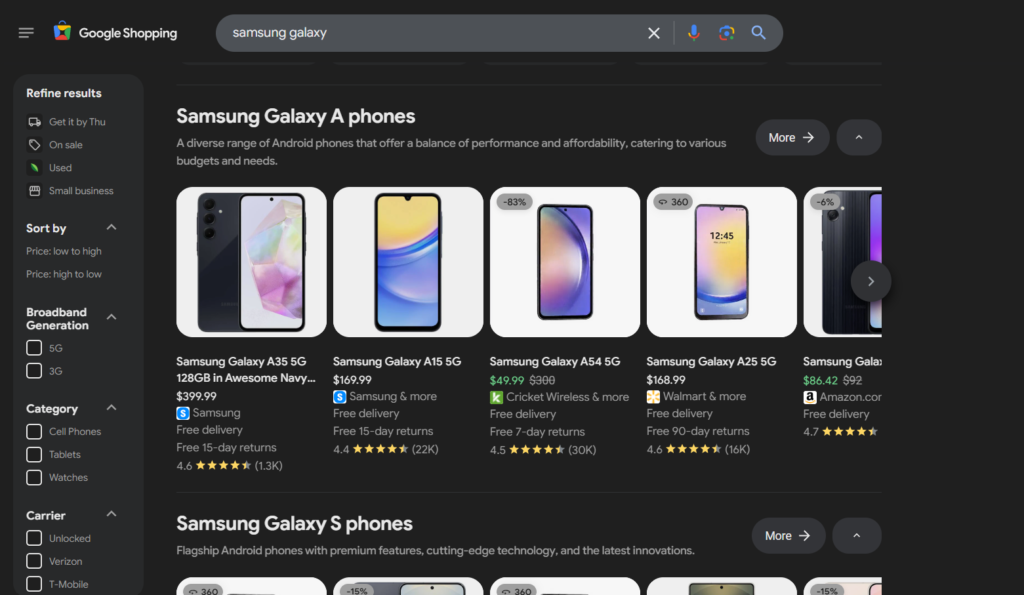
Before writing any code, it helps to know exactly what Google Shopping exposes. Here are the data points we’ll be extracting in this tutorial:
Product title — the full name of the listing
Price — current listed price
Rating — average star rating
Reviews — total number of reviews
Source — the retailer or seller name
Product URL — direct link to the product page
Thumbnail — product image URL
Google Shopping also exposes additional fields like delivery options, old/sale price, and product ID, which you can get by scraping Google Immersive data.
Scraping Google Shopping Results Using Scrapingdog’s Google Shopping API
Step 1: Install the Required Library
We only need two libraries for this tutorial:
1pip install requests pandasStep 2: Get Your Scrapingdog API Key
Head to scrapingdog.com, create a free account, and grab your API key from the dashboard. You get 1,000 free credits on signup, enough to follow this tutorial and test your queries.
Step 3: Make Your First API Call
You can get the sample Python code from the dashboard itself.
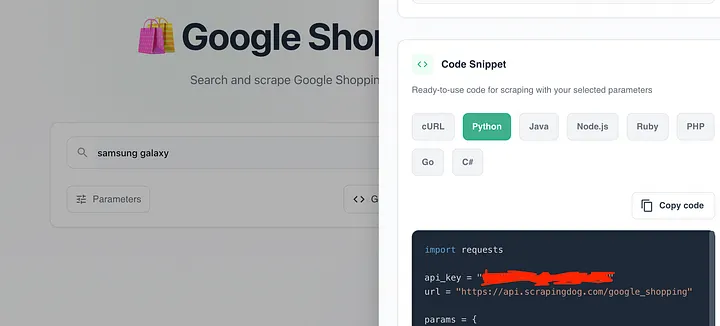
Just copy this code and paste it into your Python file.
1import requests2 3api_key = "your-api-key"4url = "https://api.scrapingdog.com/google_shopping"5 6params = {7 "api_key": api_key,8 "query": "samsung galaxy",9 "country": "us",10 "language": "en",11 "page": 0,12 "domain": "google.com"13}14 15response = requests.get(url, params=params)16 17if response.status_code == 200:18 data = response.json()19 print(data)20else:21 print(f"Request failed with status code: {response.status_code}")The API accepts the following parameters:
api_key— This is your personal API key.query- The search term you want to scrapecountry-Country code for geo-targeted results (e.g.us,uk,in)language-Language of results (e.g.en,de,fr)page-Page number for pagination (default:0)domain-Google domain to target (e.g.google.com,google.co.uk)
Full list of supported parameters in Scrapingdog’s documentation.
Step 4: Parse the Response
A successful response returns a JSON object with two main sections filters and shopping_results. Here's what a single product result looks like:
1{2 "title": "Samsung Galaxy S25 FE",3 "product_id": "18200475507255585174",4 "product_url": "https://www.google.com/search?ibp=oshop&q=samsung+galaxy&hl=en&gl=us&udm=28&prds=catalogid%3A18200475507255585174%2CheadlineOfferDocid%3A16237505128352299805%2CimageDocid%3A395672489604708062%2Crds%3APC_11752250590237752181%7CPROD_PC_11752250590237752181%2Cgpcid%3A11752250590237752181%2Cpvt%3Ahg",5 "scrapingdog_immersive_product_link": "https://api.scrapingdog.com/google_immersive_product?api_key=670d12181fecbac22c66d410&page_token=eyJlaSI6IjRZdmphY0NDTE5tRm1MUVBrb0Rwd1FjIiwicHJvZHVjdGlkIjoiMTgyMDA0NzU1MDcyNTU1ODUxNzQiLCJjYXRhbG9naWQiOiIxODIwMDQ3NTUwNzI1NTU4NTE3NCIsImhlYWRsaW5lT2ZmZXJEb2NpZCI6IjE2MjM3NTA1MTI4MzUyMjk5ODA1IiwiaW1hZ2VEb2NpZCI6IjM5NTY3MjQ4OTYwNDcwODA2MiIsInJkcyI6IlBDXzExNzUyMjUwNTkwMjM3NzUyMTgxfFBST0RfUENfMTE3NTIyNTA1OTAyMzc3NTIxODEiLCJxdWVyeSI6InNhbXN1bmcgZ2FsYXh5IiwiZ3BjaWQiOiIxMTc1MjI1MDU5MDIzNzc1MjE4MSIsInB2dCI6ImhnIiwiZ2wiOiJ1cyIsImhsIjoiZW4ifQ",6 "page_token": "eyJlaSI6IjRZdmphY0NDTE5tRm1MUVBrb0Rwd1FjIiwicHJvZHVjdGlkIjoiMTgyMDA0NzU1MDcyNTU1ODUxNzQiLCJjYXRhbG9naWQiOiIxODIwMDQ3NTUwNzI1NTU4NTE3NCIsImhlYWRsaW5lT2ZmZXJEb2NpZCI6IjE2MjM3NTA1MTI4MzUyMjk5ODA1IiwiaW1hZ2VEb2NpZCI6IjM5NTY3MjQ4OTYwNDcwODA2MiIsInJkcyI6IlBDXzExNzUyMjUwNTkwMjM3NzUyMTgxfFBST0RfUENfMTE3NTIyNTA1OTAyMzc3NTIxODEiLCJxdWVyeSI6InNhbXN1bmcgZ2FsYXh5IiwiZ3BjaWQiOiIxMTc1MjI1MDU5MDIzNzc1MjE4MSIsInB2dCI6ImhnIiwiZ2wiOiJ1cyIsImhsIjoiZW4ifQ",7 "immersive_url": "https://www.google.com/async/oapv?ei=4YvjacCCLNmFmLQPkoDpwQc&q=samsung+galaxy&gl=us&hl=en&yv=3&cs=1&async=catalogid%3A18200475507255585174%2Cgpcid%3A11752250590237752181%2CheadlineOfferDocid%3A16237505128352299805%2Crds%3APC_11752250590237752181%7CPROD_PC_11752250590237752181%2CimageDocid%3A395672489604708062%2Cquery%3Asamsung%2520galaxy%2Cpvt%3Ahg%2C_fmt%3Ajspb",8 "source": "Samsung",9 "price": "$499.99",10 "extracted_price": 499.99,11 "old_price": "$650",12 "old_price_extracted": 650,13 "rating": 4.6,14 "reviews": "116K",15 "tag": "23% OFF",16 "thumbnail": "data:image/webp;base64,UklGRloLAABXRUJQVlA4IE4LAACwSQCdASo0ARABPj0ejkSiIaMQ+zSQMAPEs7dfOhcBWV1awIIQ0gPKflFHlwUASCBPMA2gHm4+ib0AP7B1QHoZ9MH+6Fv6/Zde3jwPQLmfLSkcHonf8XnI+pvYI/Wr/getv7GPR4EfLuKUnPzotg1TwZQx5AsOCSPqDEMO4To0O4uR1sB/J7Aj/ievCIHPvz7XLuBunIoxoNSKJ2KaqVPRlUxK3V0wWr8U5HghDN/kimrC9rCJJmukihKICx2adfdy1P02DHt85//V9IIHh3mK8C9rF1CeAd85dZGDwNPkkNcB5O7kW1Zq4ZyoIuI8Wd+faxdnvCt0PxGdvF3Uk0eynn2uXftMso2VvRBnjWFlPcTyJEPyHFnfn2PL4zPCczkucn3MWbjvBrdU8l1pzuHX7/XHeV8fcu/4vWjGp/cCuKFPwozHjrcme/SBfSVP0ES+8yT2H5Z35pfDmhG2AKhNlk6reM+FmL2rAXtHNHFXXzsMuiQL2uXcJ8o0bw6zibXuaMMYyIEZI/LO/PhKqcCDbuQ7CtC267SChRltlxXgXsoU9apPOxkP0OOP672ud1YxWrC9rl2+YnHGuueUF3ecld4bbBseyfCDX5CG/Wn9rl3/F6zsGxE2VqfvBZ0syEYxDeFNQ2pe7+BO+daUkBMShXgXtYuefmkUZZLKUdmCTrd7qMMWm2JcqIV5p572sFDOzXuLO+rt3F9z3eF8BTZrZgEhuZM0Ukt0JLKf36ivAva40pj/ZRY+dUCxzJ57e1F4IueCVgrBD5wF/d63/qsNLvBYXsYAAP7/v0BN1gRSj3z++36kVbqbJFK2sv/Kru3F1yipwBHpZq9khv+F7absM//l/+GmW/BDYo6iQ6uH6PhdFgpv5chbZ1m2Q1iz0e6OlPfjsXqF405VwleMQ413rnxP5yLE/zo6ZsAcSp3zc72oc7z8dPF2mT4ERoPrbORFDItCFcGLvR2CvvG9d/B9tknNnI0hRrUcieeffqegzIvIuMET4YP81vaLGwq5Ep854Pod7C+HF1DJr4ECKwA1kCq+gFuFMMFvAzWgvL/+mgNuf8NdYRBN962df/0PRXQ/PcDp6LLk0lwRFXMrpL9AVl2hJEMvMWTLB39yePp3U4/+SBwmuvSQmJZMc482bkIffT/VlxY14LQR3b06Hme80jG9AUxSZ/D+t6UViVyXFb/pZJ75nGT1kfu+zmZ9ROlQYvalnUrNWuGZMJO/v79HBzGVZfXCwawHx63QXXmA8//vl6ZD/fMuxEyMGwG6e1tZ64bqm4NE5x8yCtFjeUdLVH98IRLQ9piHWHVy+Vi9HLqx2yufdx7VLbr3fQEczw11dRsr6fcnSkEjhSA5m/EIAN2KGSRoyN/qSXrd0AFXRkwl6jPOsA1ISdMBwTWg2QzZLWJTt+acZKZvqkhdTdNGnqmpIy6e2q+2RTr7A9L/ikdK6KDpgUDYnm3kR5ZkDC1Hc3BHB7ozLtvXRw596SdWed/6f5vqndYn8ZCsRf4z6h4h6rRUnYXAs6BwI/5v7HWuVCNTCbft04wT357davEHb71+9VGUwXuSM1tfzSKzWG5nZWarTpiDP+wHdApAryO85umbMaDThGy2I4VwElXKMT58wHBYAcD7rFww2z9LaBVtXAcLhvWx7EDJhjoFElS4de8fPVXDN81/rVC4pOB9S07tig4Am7Sh2gW29aydGd/Y+F1t3R4nycyrvJuNb+Ajz6Zl4p08NUb0twVPO66KhVR0icbL7yp2w6ZO5N/COb4YOIDlBjVG3qoLJmbfUuhVQ0K4fiJrkxgiM5GdfowBcrcFqjJmxPg25nRPcQpH/OdxlbdQZ6wp7mjbDA357KUhn4wi3OZ287tvKAXURmefwAE4Vs1DaAsam3zepegoe5xtNL/H+L5BRDa3ycQpzZl4aub10YeUOjEfjXNtBpDEaKN65yanC2ruWMCinXtm0Rn+390h8BukqPjEdpS5Q4SwgBkByOqM1EOBo9GMtfRYy4Ot9RFv0wYz/+RjxK5KEqPQbn/lD9QbJF2B74kBDeuNjAecQ/uhGFGuZrhVWEHrGsXH6lW/Pz2VTOZdJ+/TD+ScwtjOTeMqvUZ1fU+RCssQMPgNpFz1hopuMrFGQCDlgINWXIoCejiVmXSo0kKpEKy1ssWQUjTnm4W5oYt9FGO5VKwobit50n5vBhKSFpwAzMfAshGbMq1KllJmuAS4Ak4+o5nO7saSI9z8QQ2xUb8ig3gACIiWX2yjWqhJCL3Lj7ZI8SduCRzvUWwpWiGXFyatHE47kNSMzxwzX92f01zMSPpe3e5po+mGsGeD9IXES+gd+4NZj0oWv95gN3wkgSrEQj5EaNf5jBzQhaNhLzO/7CAIsP2foXdy5yCWBhhO9Wp90JQAWcf9g7KX2b+QxOeBJ9QoBXe7cRn4GRgp57fPzwnt9Tp1/4gNxJnlk8IYPUBcafE52JOdVme4kXCEiadWRuM0RagCN3oTaV3xixGdeEeZcXDlreeOzn98KDe7AUVTyD5FYYcp9bwnpCf6ZdMstbJNRtfMVqRyIj4DlaOGYapDXmCQDHlea0pOcUesgmuRVDU6M8nLtDj01DCLa9oM7kaOw93pkUmW3M0kEzFtjriWRn18GudNJXqbCo7fA0wdcx1kkzNu+i9LjKoE6e53Sr23/uRL681D0WT1y6Ve8oGE+t+F+Fe1j0IofGyTkWP9y7WLiNbOSvABxl/2MyTf1SPCmWTxGsM/pZG7Qo7XtDYtsVB+XIyT7fl8LYO1scvQ32bZmXeo2OOfP7LaYM4zoPQwMgf36LKb943tw57T/niqyRI7ceqHyBTsxgtDmqetFcwCkJtu+MFnYzQT+/H/0XmdEviUAMmfXCs12FI5zkRwW9gGd5GImrT7P0PYdRj7g1TTwGga6hp2OIlE+6/YOo4z9oq3uyOU2i3/OyG6h//i3kdZf03LxboPls89IKsL/UXg+x1t6jTs5LiMe7/b/r0vUSk8PwnMVDGOypaDICirLpmxsODBE/Q0TMDTPxFreZL65Smpo5FKOro38i5bgUfvJry2tFmv0qEAmzR8vQbWWHrhyDYoJ4xYONRDv9tvXVqoVDTYBveMOcFG8zTQku6A0suvnBJSez54rx5OjF39oRk//ydycPs8VpuCqeRVf/aM/GapFlM/TS98QRVq2RpT+mNknOVMnp4kkLpghL9+bHg72LMO+RNXEZ2/dyHD77tZ958Ig87GRR92Nokl2Fs/CviIUA1I4Br16l0H2dATHQAmigR3ujZjgrrTHll05jC0U6qweV7Ckwzk4mftDYYiW6o2XqYBhfbuRz2OYfE6iizeY5DlRnzmFzWxwavTeyeq/ykTWnZYB69bPje2hliz2X7t6O8RSJKZMxQbfgIXXsTdIUqt9reBwFGD5B88qq934AXSEUn7co+kKynOdD1mjXYeiMBBVOVBULXF+got9RSaGgoBn7TqDvoWnLDQ//Ta47IEaEERXI2pYGcROta4hHWlDBetJfFUIyFoyPL9WIUhV5PmJwhFZH4TARyLBrEgP+OtNyR/n0QrfxVY+intKhh/31xeCuTR8+8UJ9fnOIySCeBFcRxdvccRvTXEDsUQWMZKx4a1QJ16yqLeBkada1N29ym6W4b4z6E+Xfqc6SK+Xpoymu7k0lIfGtxHk/gfREg9q54j0OQGpSKtoTufmytqDu2jgx/sSdnttDojI9jvhuSDho3ueT7/HgRoYtWQqpsEtAD6qYD4+AGg9kf/LxGZ36L6aW5kk7Zt6G2eRZe9li9mwTDmiManRelQLhGYVRcgYsY7cFrnn8PmL9eGvc4Qf937j9CzZitvP/+b8kZUcZ2cAAAAAA\\x3d",17 "position": 118 }Here’s what each field gives you:
title— Full product nameprice— Displayed price stringextracted_price— Numeric price, use this for calculationsold_price/old_price_extracted— Original price before discounttag— Discount label, for example23% OFForSAVE 30%rating— Average star ratingreviews— Total review countsource— Retailer or seller namedelivery— Shipping informationextensions— Additional info, for exampleFree 15-day returnsproduct_url— Full Google Shopping product URLscrapingdog_immersive_product_link— Use this to fetch detailed product data like sellers, reviews, and images via Scrapingdog’s Google Immersive Product API.
Now, let’s extract the specific fields we need and calculate the discount amount using old_price_extracted and extracted_price:
1import requests2 3api_key = "your-api-key"4url = "https://api.scrapingdog.com/google_shopping"5 6params = {7 "api_key": api_key,8 "query": "samsung galaxy",9 "country": "us",10 "language": "en",11 "page": 0,12 "domain": "google.com"13}14 15response = requests.get(url, params=params)16 17if response.status_code == 200:18 data = response.json()19 products = []20 21 for product in data['shopping_results']:22 extracted_price = product.get('extracted_price')23 old_price = product.get('old_price_extracted')24 25 discount_amount = round(old_price - extracted_price, 2) if old_price and extracted_price else None26 27 products.append({28 'title': product.get('title'),29 'source': product.get('source'),30 'price': product.get('price'),31 'extracted_price': extracted_price,32 'old_price': product.get('old_price'),33 'discount_amount': discount_amount,34 'tag': product.get('tag'),35 'rating': product.get('rating'),36 'reviews': product.get('reviews'),37 'delivery': product.get('delivery'),38 'product_url': product.get('product_url')39 })40 41 print(products)42else:43 print(f"Request failed with status code: {response.status_code}")We use .get() on every field, so the script doesn't break if a particular product is missing data. For example, not every listing has an old_price or delivery field.
Here’s a small video go-through on how you can use Scrapingdog’s Google Shopping API ⬇️
Exporting the list of products to CSV
Finally, we will export the list of products to a CSV file. We will get the product title, pricing, rating, and source from the extracted data. Here is the complete code to get the output in a CSV file.
1import requests2import pandas as pd3 4api_key = "your-api-key"5url = "https://api.scrapingdog.com/google_shopping"6 7params = {8 "api_key": api_key,9 "query": "samsung galaxy",10 "country": "us",11 "language": "en",12 "page": 0,13 "domain": "google.com"14}15 16response = requests.get(url, params=params)17 18if response.status_code == 200:19 data = response.json()20 products = []21 22 for product in data['shopping_results']:23 extracted_price = product.get('extracted_price')24 old_price = product.get('old_price_extracted')25 discount_amount = round(old_price - extracted_price, 2) if old_price and extracted_price else None26 27 products.append({28 'title': product.get('title'),29 'source': product.get('source'),30 'price': product.get('price'),31 'extracted_price': extracted_price,32 'old_price': product.get('old_price'),33 'discount_amount': discount_amount,34 'tag': product.get('tag'),35 'rating': product.get('rating'),36 'reviews': product.get('reviews'),37 'delivery': product.get('delivery'),38 'product_url': product.get('product_url')39 })40 41 df = pd.DataFrame(products)42 df.to_csv('google_shopping_results.csv', index=False)43 print(f"Saved {len(df)} products to google_shopping_results.csv")44else:45 print(f"Request failed with status code: {response.status_code}")When you run this code, you will get a google_shopping_results.csv file inside your folder.
Google also provides richer data for individual products, such as product descriptions, seller details, price ranges, delivery dates, taxes, and more. To access that level of detail, you need to make a separate request using the Google Immersive Product API.
Key Takeaways:
The guide explains how to programmatically scrape Google Shopping results to extract product listings and pricing information.
It shows how to send search queries and retrieve structured data that includes product titles, prices, merchant names, and images.
You learn how to parse product fields such as price range, availability, currency, and store links from the response.
The tutorial demonstrates organizing the scraped shopping data into usable formats for analysis or reporting.
Scraping Google Shopping helps with price comparison, competitor analysis, product research, and e-commerce intelligence.
Conclusion
In this tutorial, you’ve learned how to scrape Google Shopping results using Python and Scrapingdog’s Google Shopping API. From making your first API call to extracting discount data, using filters, and exporting results to CSV across multiple keywords.
If you want to go beyond search results and pull individual product details, seller comparisons, user reviews, product images, and Q&A data, check out our guide on scraping Google Shopping product pages with the Immersive Product API. It picks up exactly where this tutorial leaves off.
Ready to scale up? Sign up for a free Scrapingdog account and get 1,000 credits to start scraping Google Shopping today.
Frequently Asked Questions
Is scraping Google Shopping legal?
Scraping publicly available data from Google Shopping is generally considered legal.
Why does my scraper return empty results?
Google loads product listings via async JavaScript calls, so a plain requests.get() on a Google Shopping URL returns an empty page. Scrapingdog's API handles this automatically and returns clean JSON every time.
How do I scrape Google Shopping for a specific country?
Pass the country and domain parameters in your request — for example "country": "uk" and "domain": "google.co.uk" for UK results.
How do I handle pagination?
Increment the page parameter in your request — page=0 for the first page, page=1 for the second, and so on until the results array is empty.