

Geotargeting
Get location specific data by routing requests through proxies in different countries. Useful for tracking localized prices, search rankings, and regional results.
Scrapingdog provides a powerful web scraping API along with dedicated APIs to extract data from search engines, social platforms, and e-commerce websites. We manage proxies, browsers, and blocking, so you can focus on building your product without worrying about the backend.














{
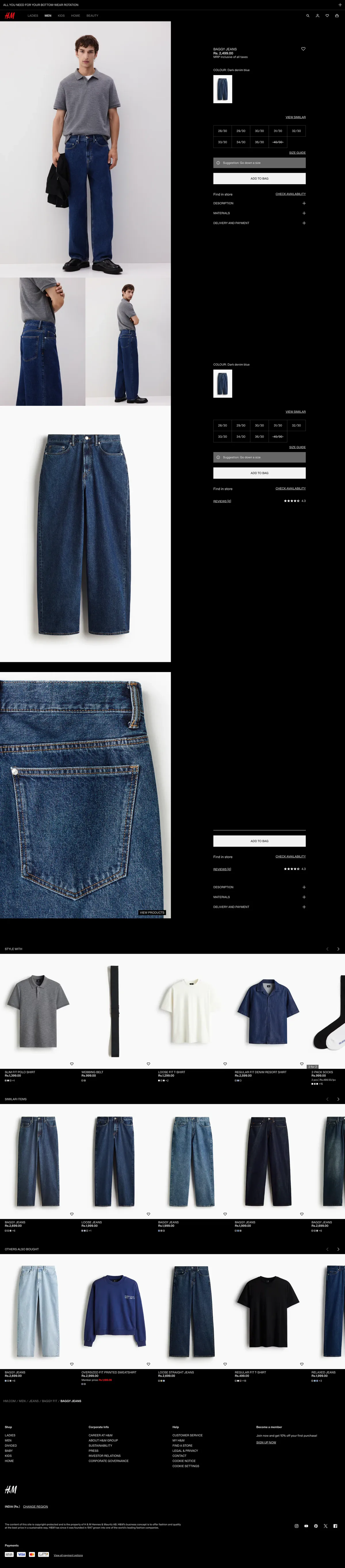
  "product_name": "Baggy Jeans",
  "price": "Rs. 2,499.00",
  "tax_inclusive": true,
  "availability": "Find in store",
  "article_number": "1285734002",
  "net_quantity": "1 N",
  "generic_name": "JEANS",
  "description": "Dark denim blue, Solid colour",
  "sizes": [
    { "size": "28/30", "width_cm": 79, "length_cm": 71 },
    { "size": "29/30", "width_cm": 81, "length_cm": 72 },
    { "size": "30/30", "width_cm": 84, "length_cm": 72 },
    { "size": "31/30", "width_cm": 86, "length_cm": 72 },
    { "size": "32/30", "width_cm": 89, "length_cm": 72 },
    { "size": "33/30", "width_cm": 91, "length_cm": 73 },
    { "size": "34/30", "width_cm": 94, "length_cm": 73 },
    { "size": "36/30", "width_cm": 98, "length_cm": 74 },
    { "size": "40/30", "width_m": 1.08, "length_cm": 75 }
  ],
  "length": "Long",
  "waist_rise": "Regular waist",
  "fit": "Oversized",
  "style": ["Baggy", "Barrel leg"],
  "quantity": "Single",
  "country_of_production": "Bangladesh",
  "material": ["Cotton", "Denim"],
  "material_percentage": { "recycled_cotton": "19%" },
  "additional_material_info": "The total weight of this product contains at least 19% Recycled cotton. The total weight of the product is calculated by adding the weight of all layers and main components together.",
  "care_instructions": "For health protection and hygiene reasons, returns are unavailable for underwear, swimwear, piercing jewelry, perfumes/fragrances, face masks, hair tools, hair accessories, beauty products/tools and cosmetics.",
  "images": [
    "https://image.hm.com/assets/hm/04/c7/04c78e2af031987a477f828309adbd84340f395b.jpg?imwidth=2160",
    "https://image.hm.com/assets/hm/04/c7/04c78e2af031987a477f828309adbd84340f395b.jpg?imwidth=2160"
  ],
  "website_links": {
    "product_page": "/en_in/productpage.1285734002.html",
    "store_locator": "https://www2.hm.com/en_in/customer-service/shopping-at-hm/store-locator.html",
    "android_app": "https://play.google.com/store/apps/details?id=com.hm.goe",
    "ios_app": "https://apps.apple.com/in/app/h-m-we-love-fashion/id834465911"
  }
}
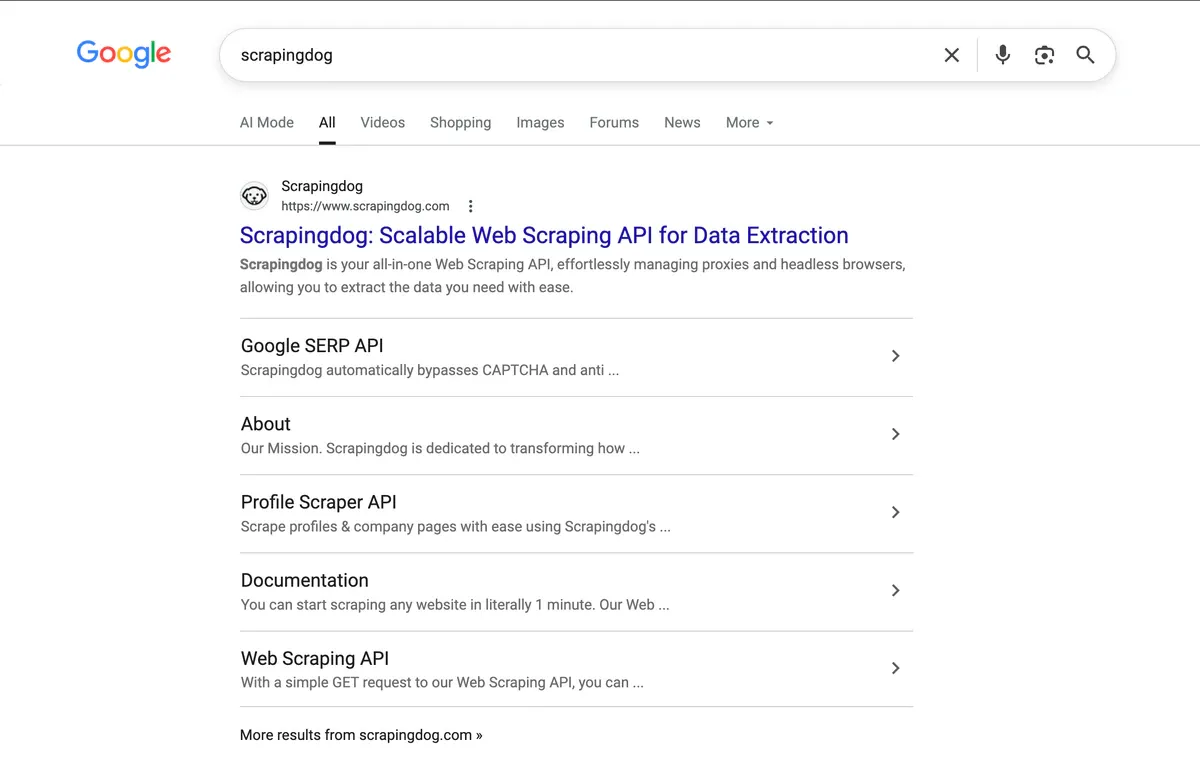
"organic_results": [
  {
    "title": "Scrapingdog: Best Web Scraping API",
    "link": "https://www.scrapingdog.com/",
    "displayed_link": "https://www.scrapingdog.com",
    "favicon": "data:image/png;base64,iVBORw0KGgoAAAANSUhEUgAA...",
    "source": "Scrapingdog",
    "snippet": "Scrapingdog is your all-in-one Web Scraping API, effortlessly managing proxies and headless browsers, allowing you to extract the data you need with ease.",
    "highlighted_keywords": ["Scrapingdog"],
    "extended_sitelinks": [
      {
        "title": "LinkedIn Profile Scraper API",
        "link": "https://www.scrapingdog.com/linkedin-scraper-api/",
        "snippet": "Real-time data for name, location, followers, company size ..."
      },
      {
        "title": "Google SERP API",
        "link": "https://www.scrapingdog.com/google-search-api/",
        "snippet": "Our Google Scraping API is designed to be easy to use and ..."
      },
      {
        "title": "Blog",
        "link": "https://www.scrapingdog.com/blog/",
        "snippet": "Scrapingdog Blog. Designed with you in mind, our web scraping ..."
      },
      {
        "title": "Documentation",
        "link": "https://docs.scrapingdog.com/",
        "snippet": "Documentation. You can start scraping any website in literally ..."
      },
      {
        "title": "About",
        "link": "https://www.scrapingdog.com/about/",
        "snippet": "Inspired by this success, I came up with the idea for Scrapingdog ..."
      }
    ],
    "rank": 1
  },
  ...
]
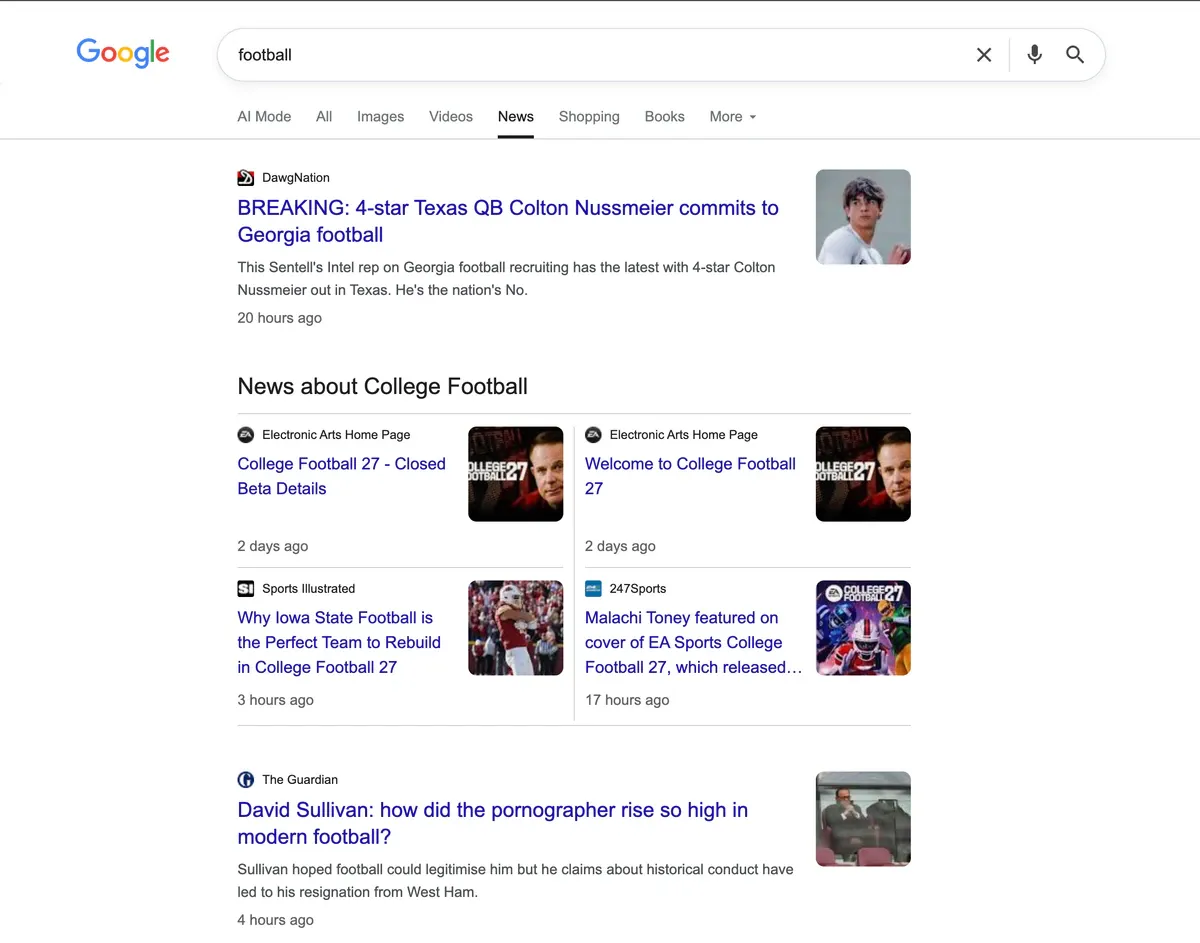
> curl "https://api.scrapingdog.com/google_news?api_key=YOUR_API_KEY&query=football&results=10&country=us"
{
  "news_results": [
    {
      "title": "Michigan football DC Wink Martindale has options as NFL coaching carousel spins",
      "snippet": "Michigan football defensive coordinator Wink Martindale interviewed for the defensive coordinator position with both the Atlanta Falcons and...",
      "source": "Detroit Free Press",
      "lastUpdated": "2 hours ago",
      "url": "https://www.freep.com/story/sports/college/university-michigan/2025/01/28/michigan-football-wink-martindale-nfl-coaching-carousel/77975601007/",
      "imgSrc": "data:image/jpeg;base64,/9j/4AAQSkZJRgABAQAAAQABAAD..."
    },
    ...
  ]
}
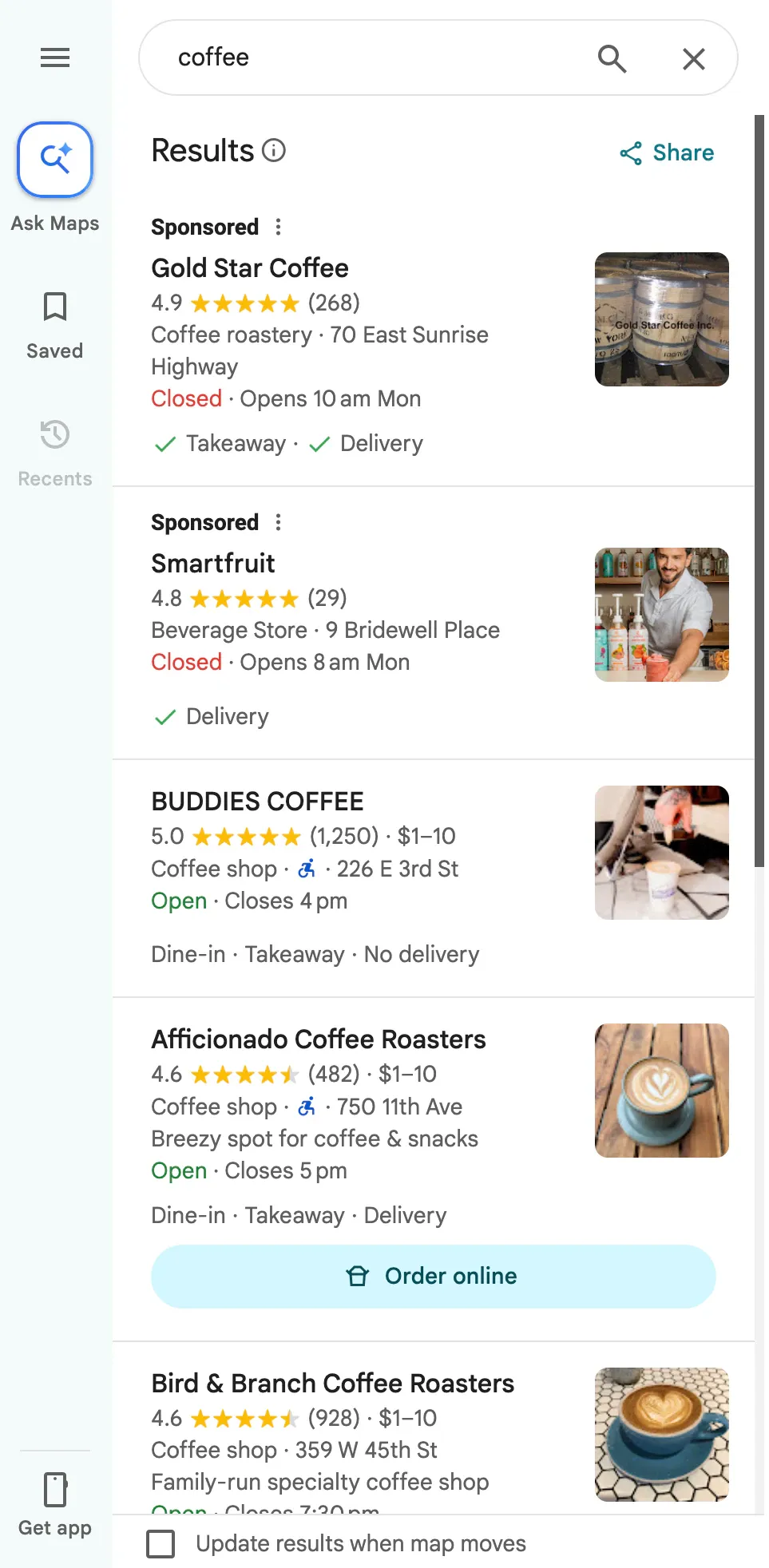
> curl "https://api.scrapingdog.com/google_maps?api_key=API_KEY&q=coffee&[email protected],-74.0083012,15.1z"

{
  "search_results": [
    {
      "title": "Gregorys Coffee",
      "place_id": "ChIJQTNrM69ZwokR3ggxzgeelqQ",
      "data_id": "0x89c259af336b3341:0xa4969e07ce3108de",
      "data_cid": "-6586903648621492002",
      "reviews_link": "https://api.scrapingdog.com/maps_reviews?api_key=API_KEY&data_id=0x89c259af336b3341:0xa4969e07ce3108de",
      "photos_link": "https://api.scrapingdog.com/maps_photos?api_key=API_KEY&data_id=0x89c259af336b3341:0xa4969e07ce3108de",
      "posts_link": "https://api.scrapingdog.com/maps_post?api_key=API_KEY&data_id=0x89c259af336b3341:0xa4969e07ce3108de",
      "gps_coordinates": { "latitude": 40.7477283, "longitude": -73.9890454 },
      "provider_id": "/g/11xdfwq9f",
      "rating": 4.1,
      "reviews": 1153,
      "price": "$$",
      "type": "Coffee shop",
      "types": ["Coffee shop"],
      "address": "874 6th Ave New York, NY 10001 United States",
      "open_state": "Open · Closes 7 pm",
      "hours": "Open · Closes 7 pm",
      "operating_hours": {
        "monday": "6:30 am-7 pm",
        "tuesday": "6:30 am-7 pm",
        "wednesday": "6:30 am-7 pm",
        "thursday": "6:30 am-7 pm",
        "friday": "6:30 am-7 pm",
        "saturday": "7 am-7 pm",
        "sunday": "7 am-7 pm"
      },
      "phone": "+1 877-231-7619",
      "description": "House-roasted coffee, snacks & free WiFi. Outpost of a chain of sleek coffeehouses offering house-roasted coffee, free WiFi & light bites.",
      "thumbnail": "https://lh5.googleusercontent.com/p/AF1QipNq-8YRdAjiVW7uFMWDzHarqoK2Pr7bxIqI7t8A=w86-h114-k-no"
    },
    {
      "title": "Paper Coffee",
      "place_id": "ChIJA5V7V69ZwokRNI_y14Yvu-w",
      "data_id": "0x89c259af577b9503:0xecbb2f86d7f28f34",
      "gps_coordinates": { "latitude": 40.7462091, "longitude": -73.9895129 },
      "type": "Coffee shop",
      "address": "44 W 29th St New York, NY 10001 United States",
      "open_state": "Open · Closes 6 pm",
      "phone": "+1 212-213-4429",
      "website": "https://www.madehotels.com/eat-drink"
    },
    ...
  ]
}
{
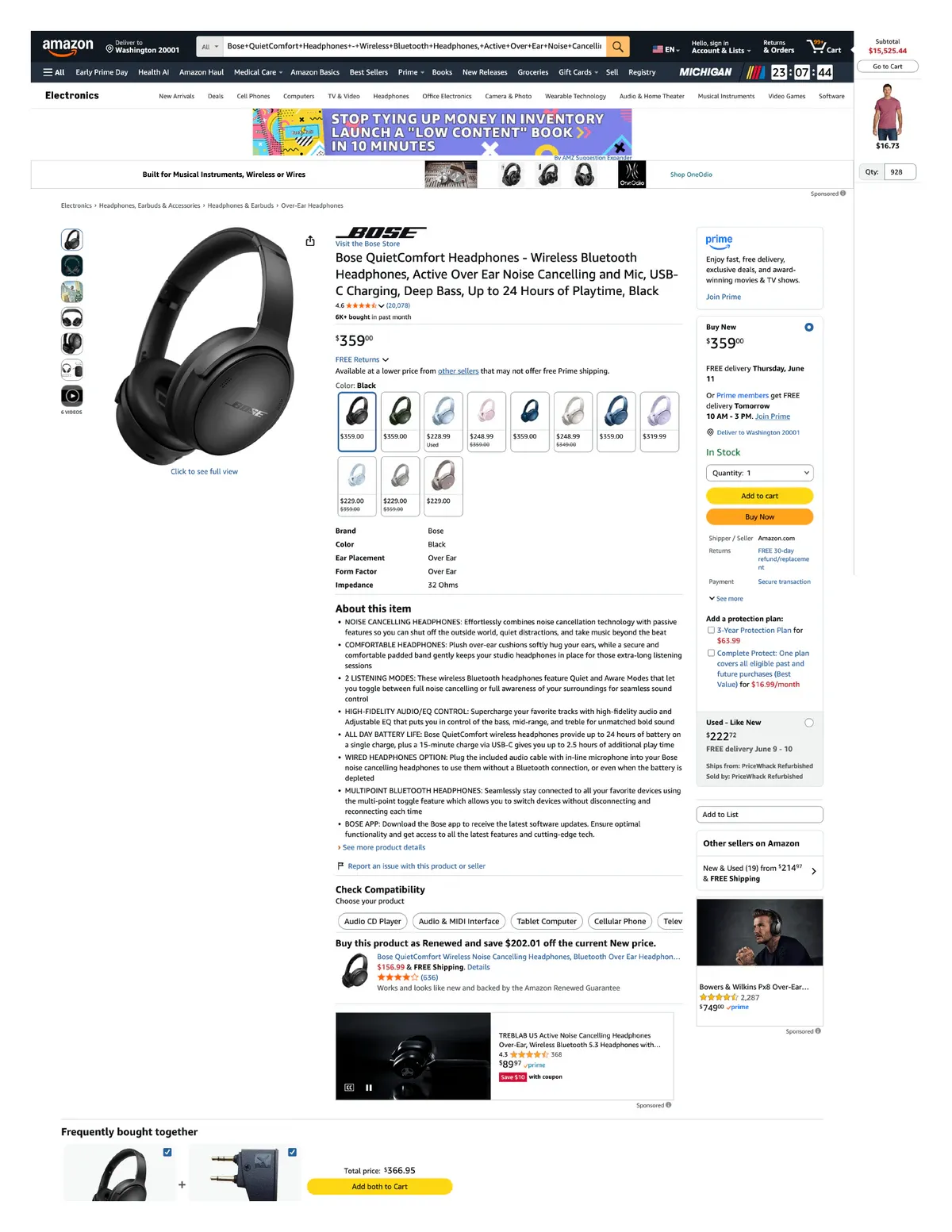
  "title": "Bose QuietComfort Headphones - Wireless Bluetooth Headphones, Active Over Ear Noise Cancelling and Mic, USB-C Charging, Deep Bass, Up to 24 Hours of Playtime, Black",
  "location": "Delivering to Washington 20001",
  "search_filter": "Electronics",
  "product_information": {
    "Brand Name": "Bose",
    "Model Number": "884367-0100",
    "Model Name": "Bose QuietComfort Wireless Noise Cancelling Headphones",
    "BuiltIn Media": "Bose QuietComfort Headphones, Cable, Protective Case, Safety Sheet, USB-C (A to C) cable (12\")",
    "Age Range Description": "Adult",
    "Customer Package Type": "FFP",
    "Number of Items": "1",
    "Is Autographed": "No",
    "Series Number": "45",
    "UPC": "017817848961",
    "Manufacturer": "Bose",
    "Warranty Description": "1 year manufacturer",
    "Best Sellers Rank": "#173 in Electronics #6 in Over-Ear Headphones",
    "ASIN": "B0CCZ26B5V",
    "Customer Reviews": { "ratings_count": "19,201", "stars": "4.6" },
    "Headphones Ear Placement": "Over Ear",
    "Earpiece Shape": "Over-ear cups",
    "Control Type": "Noise Control",
    "Item Weight": "238 Grams",
    "Impedance": "32 Ohms",
    "Noise Control": "Active Noise Cancellation",
    "Frequency Range": "20 Hz - 20,000 Hz",
    "Audio Driver Type": "Dynamic Driver",
    "Water Resistance Level": "Not Water Resistant",
    "Connectivity Technology": "Wireless",
    "Wireless Technology": "Bluetooth",
    "Bluetooth Range": "10 Meters",
    "Bluetooth Version": "5.1",
    "Color": "Black",
    "Battery Charge Time": "2.5 Hours",
    "Battery Average Life": "24 Hours"
  },
  "parent_asin": "B0CZTW3GLB",
  "brand": "Bose Store",
  "description": "Go beyond the beat and take control of the sound that puts you on top of the world with Bose QuietComfort Wireless Noise Cancelling Headphones. Experience powerful high-fidelity audio with legendary noise cancellation...",
  "price": "$218.00 with 38 percent savings",
  "price_symbol": "$",
  "is_prime_exclusive": false,
  "number_of_people_bought": "3K+ bought in past month",
  "shipping_info": "FREE Tomorrow, April 14",
  "availability_status": "In Stock",
  "previous_price": "$349.00",
  ...
}
{
  "search_information": {
    "location": {
      "postal_code": "95829",
      "province_code": "CA",
      "city": "Sacramento",
      "store_id": "3081"
    }
  },
  "product_results": {
    "us_item_id": "1452292249",
    "product_id": "1UPI275OBZUZ",
    "variants": ["actual_color-blue", "screen_size-7in"],
    "upc": null,
    "title": "TEAYINGDE Kids Tablet 7 inch Android 12 Tablet Pc with WiFi 32GB Tablet for Ages 2-8 Kids Tablet with Silicone Case Google Play Parental Control APP (32GB, Blue)",
    "category": [
      { "name": "Electronics", "url": "https://www.walmart.com/cp/electronics/3944" },
      { "name": "iPad & Tablets", "url": "https://www.walmart.com/cp/ipad-tablets/1078524" },
      { "name": "Android Tablets", "url": "https://www.walmart.com/cp/android-tablets/1231200" },
      { "name": "Android Tablets for Kids", "url": "https://www.walmart.com/cp/android-tablets-for-kids/5025899" }
    ],
    "seller_id": "3D6CD4AFE8894E55AAE963828ECAE9FE",
    "seller_name": "shenzhenshiyoupinyouchuangkejiyouxiangongsi",
    "seller_display_name": "Youpins Youchuang Tech.",
    "specifications": [
      { "name": "Age group", "value": "Child" },
      { "name": "Features", "value": "Parental Controls" },
      { "name": "Battery life", "value": "8 h" },
      { "name": "OS", "value": "Android 12.0" },
      { "name": "Material", "value": "Silicone" },
      { "name": "Screen size", "value": "7 in" },
      { "name": "Brand", "value": "TEAYINGDE" },
      { "name": "Data storage", "value": "128 GB" },
      { "name": "Ram memory", "value": "2 GB" },
      { "name": "Processor", "value": "Quad-Core" },
      { "name": "Display", "value": "IPS LCD" },
      { "name": "Native resolution", "value": "1024x600" },
      { "name": "Color", "value": "Blue" },
      { "name": "Wireless", "value": "Wi-Fi" }
    ],
    "product_page_url": "https://www.walmart.com/ip/TEAYINGDE-Kids-Tablet-.../1452292249",
    "price_map": { "price": 46.99, "currency": "USD", "was_price": {} },
    ...
  }
}
Websites detect bots quickly, and suddenly your requests stop working. You keep getting blocked again and again, and it gets frustrating.
40M+ rotating proxies, browser rendering, and built-in anti-bot handling. Scrapingdog takes care of it automatically so your scraping never stops.
Headless browsers crash. Proxy providers go down at any time. CAPTCHAs appear randomly. Your team ends up fixing scrapers instead of building the product.
One web scraping API replaces your entire scraping stack. Browser rendering, CAPTCHA handling, and retries are all managed automatically. Integrate in minutes.
Scaling a scraper from 1,000 to 1,000,000 pages requires servers, proxy contracts, bandwidth, and dedicated engineers. Your infrastructure costs grow faster than your data.
Pay only for successful requests, nothing wasted. Scale to millions of requests with zero infrastructure headaches.
Get location specific data by routing requests through proxies in different countries. Useful for tracking localized prices, search rankings, and regional results.
Scale from a few requests to millions without changing your code. Run multiple requests in parallel with built-in infrastructure handling.
Advanced anti-bot handling with fingerprint rotation and human like request patterns to reduce blocks on protected websites.
We use headless Chrome so JavaScript-heavy and dynamic websites render exactly like a real browser. You get clean, complete data every time.
Requests automatically rotate across IPs, countries, and carriers so you never hit rate limits or bans.
When target websites throw CAPTCHA or other challenges, Scrapingdog solves them automatically in the background.
Extract product titles, pricing, ASIN, seller name, ratings, reviews, and availability data from Amazon at scale. Structured JSON, no parsing required. Ideal for price intelligence and competitive analysis.
Learn MoreCollect organic results, ads, featured snippets, and People Also Ask data from Google SERPs at scale. Use for SEO monitoring, rank tracking, competitor research, and training LLMs with fresh web data.
Learn MoreRetrieve product data including price, seller ID, seller name, stock status, and category from Walmart’s catalog. Perfect for retail analytics and marketplace monitoring pipelines.
Learn MoreExtract structured data from public profiles and company pages at scale: names, roles, experience, and organization details. Clean JSON, no parsing required. Ideal for recruiting, lead enrichment, and people analytics.
Learn MoreTrack competitor prices across thousands of product pages daily. Scrapingdog handles pagination, authentication walls, and rate limits automatically.
Collect structured contact data, company details, and decision-maker profiles from public directories and listing sites.
Gather high-quality, diverse web data to train, fine-tune, and evaluate large language models. Scrapingdog’s LLM-ready Markdown output.
Extract images, descriptions, SKUs, attributes, and categories from e-commerce sites for catalog enrichment, marketplace.
Scrape live SERP data to track keyword rankings, detect algorithm changes, monitor featured snippets, and benchmark against competitors.
Power your SaaS product with live web data without building and maintaining your own scraping infrastructure.
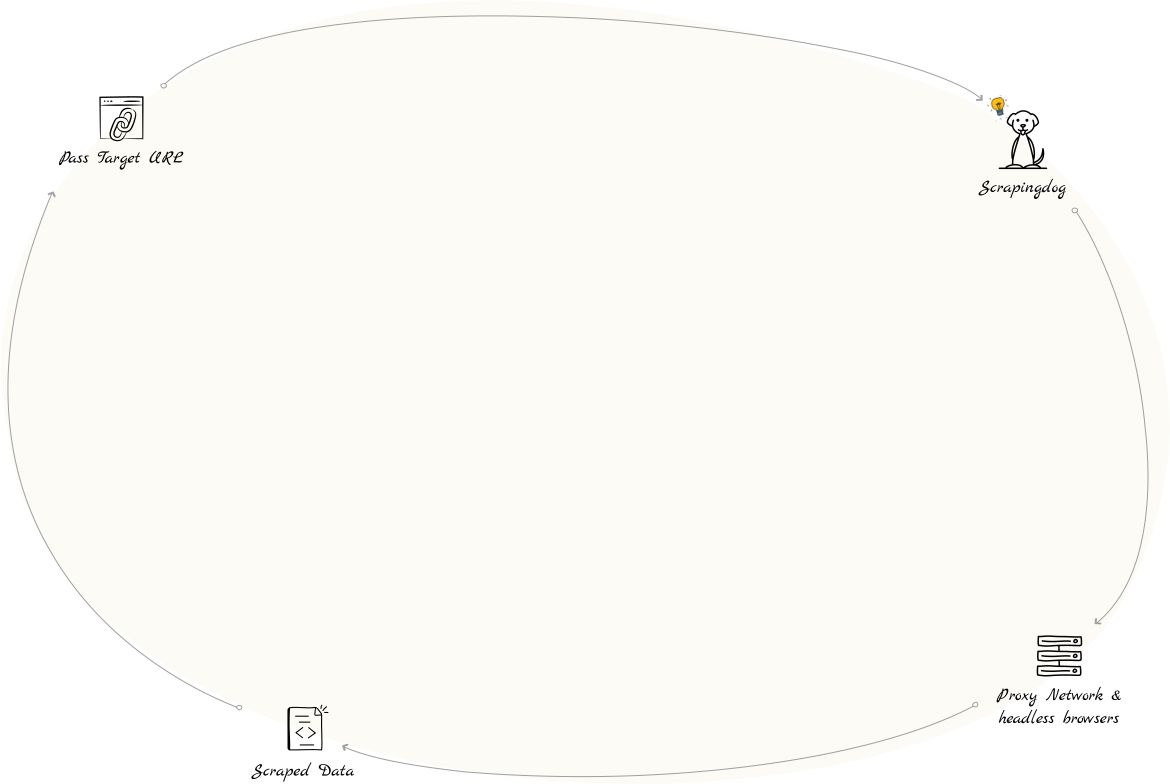
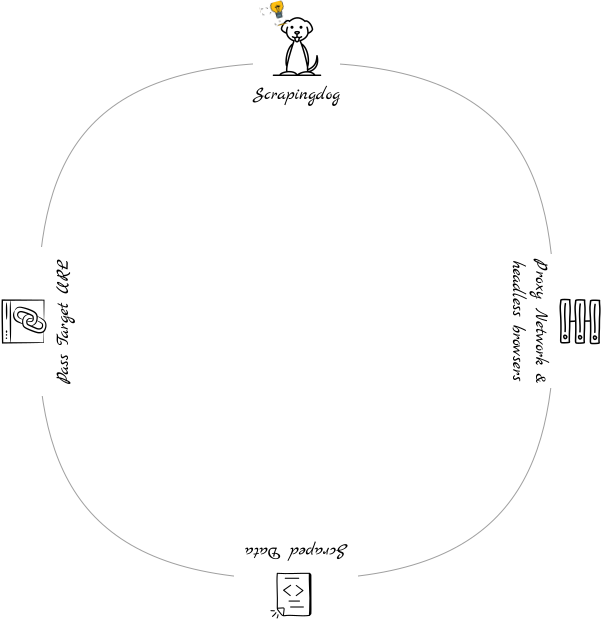
Pass a URL and get clean, structured text your model can understand. Scrapingdog removes unwanted elements, handles CAPTCHAs, and delivers easy-to-read output.
curl "https://api.scrapingdog.com/google/ai_mode/?api_key=YOUR_KEY&query=scrapingdog"

{
  "references": [
    {
      "link": "https://www.scrapingdog.com/",
      "title": "Scrapingdog: Best Web Scraping API",
      "snippet": "Our web scraping API takes care of rotating proxies, headless browsers, and CAPTCHAs.",
      "source": "Scrapingdog",
      "index": 1
    }
  ],
  "textBlocks": [
    {
      "type": "list",
      "list": [
        {
          "snippet": "Headless Chrome Rendering: Uses multiple instances of headless browsers to scrape data from websites that rely on JavaScript for content rendering."
        },
        {
          "snippet": "Rotating Proxy Pool: Maintains a pool of over 40 million proxies to overcome rate limiting and prevent blocking, ensuring a high success rate."
        },
        {
          "snippet": "High Success Rate and Speed: Claiming to be one of the fastest web scraping APIs, Scrapingdog boasts a high success rate, particularly for top-level domains.",
          "links": [
            {
              "anchor": "Scrapingdog",
              "url": "https://www.scrapingdog.com/"
            }
          ]
        }
      ]
    }
  ]
}
I’ve been using Scrapingdog for a few days and I’ve found it very user-friendly. Setting up my first data extraction was simple, and the interface makes it easy to understand each step.
United States
Their API success rate is 100% on the tests that I have done. The service seems very reliable.
New York, USA
Reliable, and simple to use! It’s also inexpensive and has packaged solution for every needs (Google, LinkedIn). Highly recommend.
France
Amazing service. I am using it for Google Maps reviews and it works perfectly. I have also used Live chat and they were very fast and puctual on responses. 100% recommended.
Italy

CEO & Co-Founder
I built Scrapingdog because I was tired of writing the same proxy rotation and anti-bot workarounds on every project. A decade in web data taught me that developers shouldn’t spend their time fighting infrastructure, they should spend it building. Scrapingdog is what I wish had existed from day one.

CTO & Co-Founder
I’m Darshan Khandelwal, a Co-Founder at Scrapingdog, a scraping API platform built for developers who need reliable, large-scale data extraction. I focus on keeping our backend systems fast, stable, and scalable under high concurrency. Behind every successful scrape, there’s a lot of infrastructure work making it happen, that’s my domain.
Start your web scraping journey with 200 free credits. Test our service and upgrade to one of the plans below. Cancel anytime.
Scrapingdog is a web scraping API that lets you scrape data from a source you desire. When you need data in bulk, you can use a web scraping API. We have multiple dedicated APIs built to extract data from different platforms, including Google Search, Profile Scraper & Amazon Product Data that give you output in parsed JSON format.
If you use up your credits before the end of your current subscription cycle, you have two options:
No, you only need a single account to use our dedicated scrapers. For example, if you want to use both the Google Scraper API and the LinkedIn Scraper API simultaneously, you can do so with one account. However, please note that Scrapingdog operates on a credit system, and each dedicated scraper has different credit usage per call request. For more information on the credit system, please refer to the documentation.
We only charge for successful requests. If your request fails credits in your account remain intact.
Yes, our API is built to handle high volumes of concurrent requests while maintaining performance and reliability. We process millions of requests every month with stable uptime.
Each API request consumes a certain number of credits based on the dedicated API you're using.
For example the Google Search API costs 5 credits per request. So, if you make one request to the Google Search API, it will deduct 5 credits from the available credits in your account. The number of credits required per request can vary depending on the specific API you're using.
You can find more details about the credit usage for each API in the documentation.
Get 200 free credits to spin the API. No credit card required!



'%3e%3cpath%20fill='%233ea380'%20d='M11.547%2041.2c0-.953-.075-1.75.034-2.522.047-.328.43-.68.744-.877%201.522-.966%203.176-1.739%204.595-2.848%204.594-3.591%207.317-8.319%207.466-14.461.041-1.743-.6-2.18-2.063-1.499-4.228%201.96-8.776.81-11.202-2.832-2.645-3.976-2.272-9.27.898-12.741%204.048-4.433%2010.712-4.567%2015.308-.33%202.751%202.537%204.06%205.813%204.386%209.54%201.093%2012.48-5.167%2022.77-16.564%2027.29-1.128.447-2.283.814-3.602%201.28'/%3e%3c/g%3e%3cg%20clip-path='url(%23b)'%3e%3cpath%20fill='%233ea380'%20d='M39.016%2041.2c0-.953-.076-1.75.034-2.522.047-.328.43-.68.744-.877%201.522-.966%203.175-1.739%204.595-2.848%204.594-3.591%207.316-8.319%207.466-14.461.041-1.743-.601-2.18-2.064-1.499-4.228%201.96-8.775.81-11.2-2.832-2.646-3.976-2.274-9.27.897-12.741%204.048-4.433%2010.712-4.567%2015.307-.33%202.752%202.537%204.06%205.813%204.386%209.54%201.095%2012.48-5.166%2022.77-16.563%2027.29-1.127.447-2.283.814-3.601%201.28'/%3e%3c/g%3e%3c/g%3e%3cdefs%3e%3cclipPath%20id='a'%3e%3cpath%20fill='%23fff'%20d='M0%200h41.2v41.2H0z'/%3e%3c/clipPath%3e%3cclipPath%20id='b'%3e%3cpath%20fill='%23fff'%20d='M27.469%200h41.2v41.2h-41.2z'/%3e%3c/clipPath%3e%3c/defs%3e%3c/svg%3e)