TL;DR
- Learn how to scrape ChatGPT using Python and retrieve structured JSON responses with a single API call.
- Use Scrapingdog's ChatGPT Scraper API to avoid browser automation, Cloudflare restrictions, and frequent UI changes while extracting structured content blocks and Markdown.
- Parse headings, paragraphs, and bullet lists in Python to build AI monitoring, research, and automation workflows.
- Ideal for brand monitoring, competitor research, AI visibility tracking, and LLM-powered content pipelines.
ChatGPT has become one of the most used AI platforms on the internet. Developers, researchers, and marketers are increasingly interested in extracting ChatGPT responses at scale. Whether to track what ChatGPT says about their brand, build AI monitoring pipelines, or power LLM-based research workflows.
The problem? Scraping ChatGPT manually is painful. It requires browser automation, anti-bot bypass logic, session management, and handling dynamic content, all of which break frequently as OpenAI updates its platform.
In this guide, you will learn how to scrape ChatGPT with Python and Scrapingdog’s ChatGPT Scraper API, a dedicated solution that handles all the complexity for you, so you can extract ChatGPT responses with a single API call.
Why Scrape ChatGPT?
Most people use ChatGPT interactively, but querying it programmatically at scale unlocks real business value. Here’s why developers and companies do it:
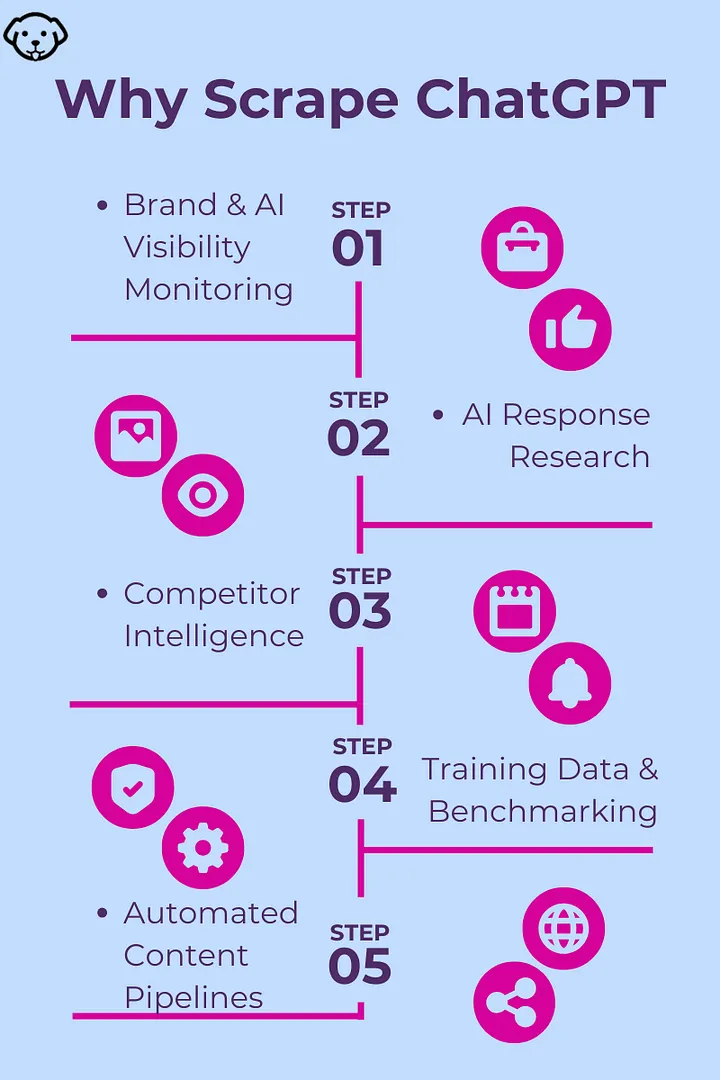
Brand & AI Visibility Monitoring — Many users ask ChatGPT for recommendations instead of Googling. Scraping lets you track whether ChatGPT mentions your brand or your competitors.
AI Response Research — Study LLM behavior, bias, or hallucinations by collecting responses to hundreds of prompts systematically.
Competitor Intelligence — You can query ChatGPT about competitor products, pricing, and features, and combine it with structured product data from APIs like Amazon Scraper API to validate what ChatGPT recommends against real-time pricing and listings.
Training Data & Benchmarking — Use ChatGPT responses as reference data when fine-tuning or benchmarking your own models.
Automated Content Pipelines — Feed ChatGPT responses into enrichment or summarization workflows without manual copy-pasting.
What Is Scrapingdog’s ChatGPT Scraper API?
Scrapingdog has recently launched a dedicated ChatGPT Scraper API . You just have to pass a query/prompt to the API and in return you will get clean, structured JSON, without dealing with any of the underlying browser automation or anti-bot complexity.
Key features:
Submit any prompt and get ChatGPT’s response back as structured data
No browser automation required .
Handles Cloudflare restrictions.
Supports concurrent requests for high-volume workflows
Returns clean JSON output ready for downstream processing
Python-friendly with simple
requestsintegration
This means you can focus entirely on your data pipeline, not on fighting OpenAI’s anti-scraping stack.
Prerequisites
Before you start, make sure you have:
Python 3.8+ installed
A Scrapingdog account with an API key.
The requests library installed:
1pip install requestsThat’s it. No Playwright, no Selenium, no proxy configuration required.
Scraping ChatGPT with Python
Let’s start with the simplest possible example by sending a single prompt to ChatGPT and printing the response.
We will start from the dashboard.
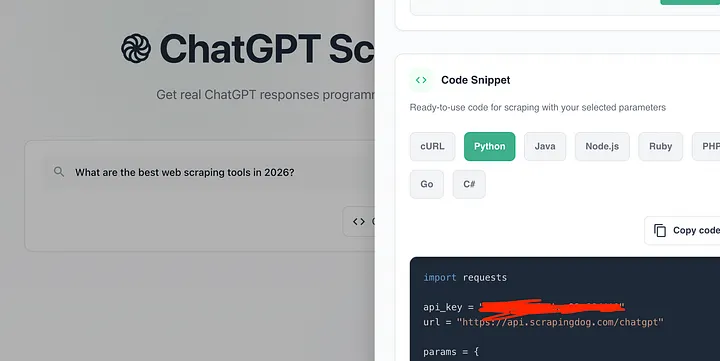
Once you pass the query/prompt in the scraper you will get a ready to use python code.
1import requests2 3api_key = "your-api-key"4url = "https://api.scrapingdog.com/chatgpt"5 6params = {7 "api_key": api_key,8 "prompt": "What are the best web scraping tools in 2026?"9}10 11response = requests.get(url, params=params)12 13if response.status_code == 200:14 data = response.json()15 print(data)16else:17 print(f"Request failed with status code: {response.status_code}")This code sends a prompt to Scrapingdog’s ChatGPT Scraper API and prints the response.
Here’s the flow:
Sets up credentials — your API key and the endpoint URL.
Defines params — the API key and the prompt you want to send to ChatGPT.
Makes a GET request — sends the prompt to the API via
requests.get().Handles the response — if successful (status
200), parses and prints the JSON response; otherwise prints the error code.
Once you run this code you get this JSON response.
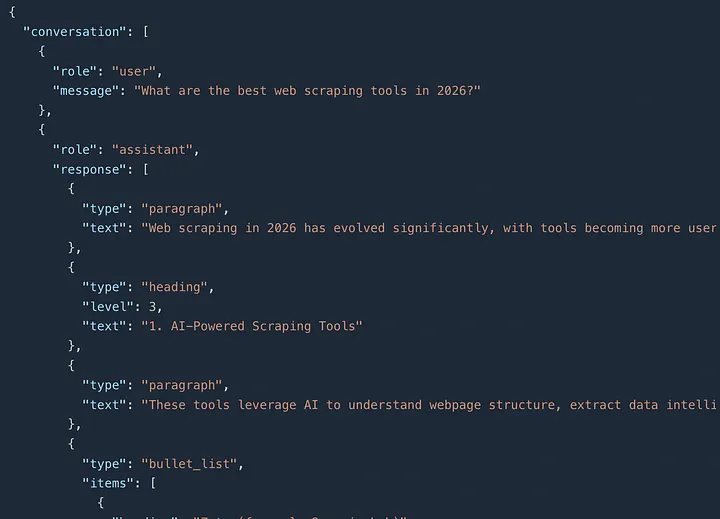
The response has two main fields:
1. conversation A structured array containing the full exchange — your prompt (user) and ChatGPT's reply (assistant). The assistant's response is broken down into typed content blocks:
paragraph— introductory or descriptive textheading— section titles (e.g., "AI-Powered Scraping Tools")bullet_list— tools listed under each category with their strengths and best-use cases
2. markdown The exact same response, but as a raw markdown string — useful if you want to render it directly in a UI or blog without parsing the structured JSON.
Parsing the API Response
The response contains structured content blocks inside conversation[-1]["response"]. Here's how to handle each block type — paragraph, heading, and bullet_list and extract clean text from them.
1import requests2 3API_KEY = "your_scrapingdog_api_key"4ENDPOINT = "https://api.scrapingdog.com/chatgpt"5 6 7def parse_response_blocks(blocks: list) -> str:8 """9 Parse the assistant's structured response blocks into plain text.10 Handles: paragraph, heading, bullet_list11 """12 lines = []13 14 for block in blocks:15 block_type = block.get("type")16 17 if block_type == "paragraph":18 lines.append(block.get("text", ""))19 lines.append("") # blank line after paragraph20 21 elif block_type == "heading":22 level = block.get("level", 2)23 prefix = "#" * level24 lines.append(f"{prefix} {block.get('text', '')}")25 lines.append("")26 27 elif block_type == "bullet_list":28 for item in block.get("items", []):29 heading = item.get("heading", "")30 text = item.get("text", "")31 # Skip duplicate sub-items (heading-only entries like "Strengths:", "Best for:")32 if text and heading not in ("Strengths:", "Best for:"):33 lines.append(f"- **{heading}**: {text}" if heading else f"- {text}")34 lines.append("")35 36 return "\n".join(lines)37 38 39def query_chatgpt(prompt: str) -> dict:40 """41 Query ChatGPT via Scrapingdog and return a parsed result dict.42 """43 response = requests.get(44 ENDPOINT,45 params={"api_key": API_KEY, "prompt": prompt},46 timeout=9047 )48 response.raise_for_status()49 data = response.json()50 51 # Extract the assistant turn (always the last in the conversation)52 assistant_turn = data["conversation"][-1]53 response_blocks = assistant_turn.get("response", [])54 55 return {56 "prompt": data["conversation"][0]["message"],57 "markdown": data.get("markdown", ""), # pre-rendered markdown string58 "parsed_text": parse_response_blocks(response_blocks), # custom parsed text59 "raw_blocks": response_blocks # original structured blocks60 }61 62 63if __name__ == "__main__":64 result = query_chatgpt("What are the best web scraping tools in 2026?")65 66 print("Prompt:", result["prompt"])67 print("\n--- Parsed Text ---")68 print(result["parsed_text"])69 70 print("\n--- Markdown (pre-rendered) ---")71 print(result["markdown"][:500], "...") # preview first 500 charsExtracting Specific Block Types
If you only need specific content, for example just the headings to build a table of contents or just the bullet points, you can filter the blocks directly:
1def extract_headings(blocks: list) -> list[str]:2 """Return all heading texts from the response."""3 return [b["text"] for b in blocks if b.get("type") == "heading"]4 5 6def extract_bullet_items(blocks: list) -> list[dict]:7 """Return all bullet list items across all bullet_list blocks."""8 items = []9 for block in blocks:10 if block.get("type") == "bullet_list":11 for item in block.get("items", []):12 # Filter out sub-label duplicates13 if item.get("text") and item.get("heading") not in ("Strengths:", "Best for:"):14 items.append(item)15 return items16 17 18# Usage19result = query_chatgpt("What are the best web scraping tools in 2026?")20blocks = result["raw_blocks"]21 22print("Sections:", extract_headings(blocks))23print("Tools mentioned:", [i["heading"] for i in extract_bullet_items(blocks)])Real-World Use Cases
Brand Monitoring on ChatGPT- Track what ChatGPT says about your company across different question angles:
1brand_prompts = [2 "What is Scrapingdog?",3 "What are the best web scraping APIs?",4 "Is Scrapingdog a good tool for web scraping?",5 "What alternatives are there to Scrapingdog?",6 "What do people say about Scrapingdog?"7]8 9results = batch_query_chatgpt(brand_prompts)Schedule this to run weekly or daily and compare the markdown responses over time to see how your ChatGPT visibility changes.
2. Competitor Research
1competitor_prompts = [2 "Compare Scrapingdog vs Brightdata for web scraping",3 "What is the cheapest web scraping API in 2025?",4 "Which scraping API has the best Google SERP support?",5 "What are developers saying about Apify vs Scrapingdog?"6]7 8competitor_data = batch_query_chatgpt(competitor_prompts)3. SEO & AI Visibility Research- As ChatGPT increasingly influences user decisions, knowing whether your content surfaces in its responses is critical. Pair this with Google Search Result Scraper to compare your rankings across both Google and ChatGPT simultaneously:
1seo_prompts = [2 "Best Python tutorial sites in 2025",3 "Where can I learn web scraping online?",4 "Top blogs about Python and data engineering",5]6 7seo_visibility = batch_query_chatgpt(seo_prompts)8 9# Check if your brand appears in the markdown response10your_brand = "scrapingdog"11for r in seo_visibility:12 mentioned = your_brand.lower() in r["markdown"].lower()13 print(f"Prompt: {r['prompt'][:50]}")14 print(f"Mentioned: {'✅ YES' if mentioned else '❌ NO'}\n")Note: You should also use the Google News Scraping API to monitor your brand's mentions on the Internet.
Key Takeaways:
DIY scraping of ChatGPT is fragile — Cloudflare protection, streaming responses, and frequent UI changes make browser automation an unreliable approach for production use.
The API returns structured blocks, not plain text — responses come as typed content blocks (
paragraph,heading,bullet_list) plus a pre-renderedmarkdownfield; parse accordingly.Use markdown for simplicity, raw_blocks for control — if you just need the text, grab
data["markdown"]; if you need to extract headings or bullet items individually, iterate overconversation[-1]["response"].Brand and AI visibility monitoring is the killer use case — as users shift from Google to ChatGPT for recommendations, tracking whether ChatGPT mentions your product is becoming as important as tracking your Google rankings.
Conclusion
Scraping ChatGPT manually is possible but fragile, browser automation breaks with every OpenAI update, session management is tedious, and handling streaming responses adds significant complexity.
Scrapingdog’s ChatGPT Scraper API eliminates all of that. With a single API call, you get ChatGPT’s response in clean JSON, ready to process in Python. Whether you’re building a brand monitoring pipeline, running AI research at scale, or tracking how ChatGPT talks about your product, this approach is production-ready from day one.
Frequently Asked Questions
Is scraping ChatGPT legal?
In this article, whatever we scraped was available publicly. Scrapingdog does not scrape anything that is behind a login screen.
Why not use the OpenAI API directly?
The OpenAI API generates responses; it doesn’t reflect what ChatGPT’s web interface says with web search enabled. Plus, scraping ChatGPT with Scrapingdog is almost 15x cheaper than using the API.
Will the API break when OpenAI updates its UI?
No. Scrapingdog maintains the underlying infrastructure, so UI changes on OpenAI’s end are handled on their side; your code stays untouched.
Can I use this with async Python?
Yes. Wrap the requests calls with httpx and asyncio for concurrent scraping.
What does the API return?
A conversation array (structured content blocks per turn) and a markdown field (full response as a ready-to-use Markdown string). See Scrapingdog's docs for the full schema.