Google Search is one of the most valuable sources of publicly available data, from SERP rankings and competitor analysis to keyword research and lead generation. But scraping it is not straightforward. Google actively blocks bots, changes its HTML structure, and heavily relies on JavaScript rendering.
In this guide, you’ll learn how to scrape Google Search results using Node.js and later with the Google SERP API. If you prefer Python, check out our guide on scraping Google Search with Python.
TL;DR
If you’re short on time or already understand the scraping logic, you can simply copy this code and use it in your environment.
1const axios = require('axios');2 3const params = {4 api_key: 'your-api-key',5 query: 'what is scraping?',6 country: 'us',7 advance_search: 'true',8 domain: 'google.com'9};10 11axios.get('https://api.scrapingdog.com/google', { params })12 .then(response => {13 console.log(response.data);14 })15 .catch(error => {16 console.error('Error:', error.message);17 });Don’t forget to use your own API key.
Challenges of Scraping Google Search
Bot Detection — Google fingerprints requests using IP reputation, request headers, and behavioral patterns.
JavaScript Rendering — Results are JS-rendered, so raw HTTP libraries like Axios return incomplete HTML. A full browser environment is required.
CAPTCHA — Suspicious traffic triggers CAPTCHA, which becomes a major blocker at scale.
Frequent DOM Changes — Google updates its HTML structure without notice, breaking selectors regularly.
IP Blocking — High request volumes from a single IP get it banned fast. Proxy rotation is almost mandatory.
Geo-Restricted Results — SERPs vary by location, so region-specific scraping requires geo-targeted proxies.
Prerequisites
Before getting started, make sure you have the following:
Node.js (v18 or above) and npm installed on your machine. If you are new to JavaScript scraping, you can first read our guide on web scraping with Node.js.
Plawright for rendering the Google search page. You can install it with the command npm install playwright.
Axios for making an HTTP connection with the host website. You can install it with the command npm install axios.
Cheerio for parsing the raw HTML. Cheerio can be installed via npm install cheerio.
A Scrapingdog API key. You can get this by signing up for the trial pack.
Method 1: Scraping Google Search with Playwright and Cheerio
First, we will fetch the raw HTML using Playwright. Then, we will parse that HTML using Cheerio. If you want to learn the basics of Playwright first, check out our guide on web scraping with Playwright.
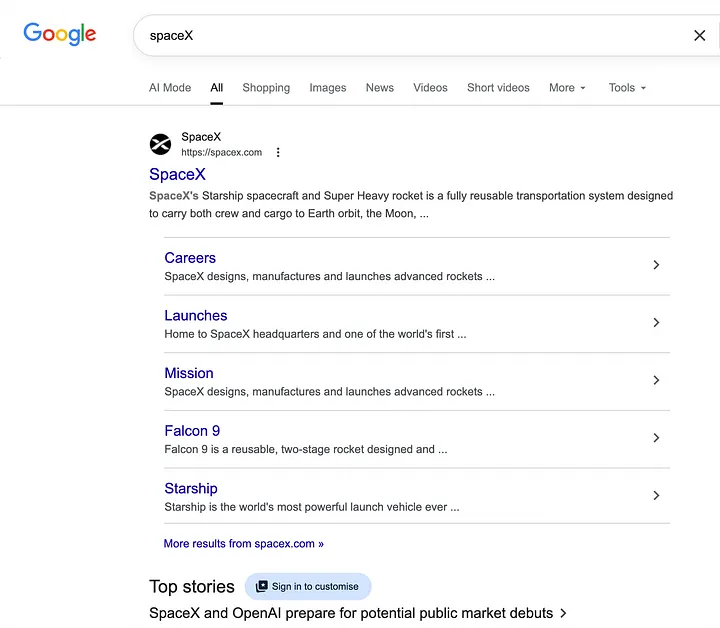
For this tutorial, we will scrape this page from Google.
1const { chromium } = require('playwright');2const cheerio = require('cheerio');3 4async function scrapeGoogleSearch(query) {5 const browser = await chromium.launch({6 headless: false,7 channel: 'chrome' 8 });9 10 const page = await browser.newPage();11 12 await page.setViewportSize({ width: 1920, height: 1080 });13 14 // Navigate to search results15 const searchUrl = `https://www.google.com/search?q=${query}&gl=us&hl=en`;16 await page.goto(searchUrl, { waitUntil: 'domcontentloaded' });17 18 const html = await page.content();19 await browser.close();20 return html;21 22}23 24// Run25scrapeGoogleSearch('spaceX').then(results => {26 console.log(JSON.stringify(results, null, 2));27}).catch(console.error);Here is what the code is doing:
1. Launch a real Chrome browser- Playwright launches an actual Chrome instance (channel: 'chrome') with headless: false, meaning the browser runs visibly. This avoids the bot detection that headless mode often triggers.
2. Open a new page and set viewport- A new browser tab is created and the viewport is set to 1920x1080, a standard desktop resolution that mimics a real user.
3. Build the search URL and navigate- The query is embedded into a standard Google Search URL with gl=us&hl=en to lock results to English (US). Playwright navigates to it and waits until the DOM is loaded.
4. Extract the full page HTML- Once the page is rendered, page.content() grabs the complete HTML including all JS-rendered content — something raw HTTP libraries cannot do.
5. Close the browser and return HTML- The browser is closed cleanly and the raw HTML is returned.
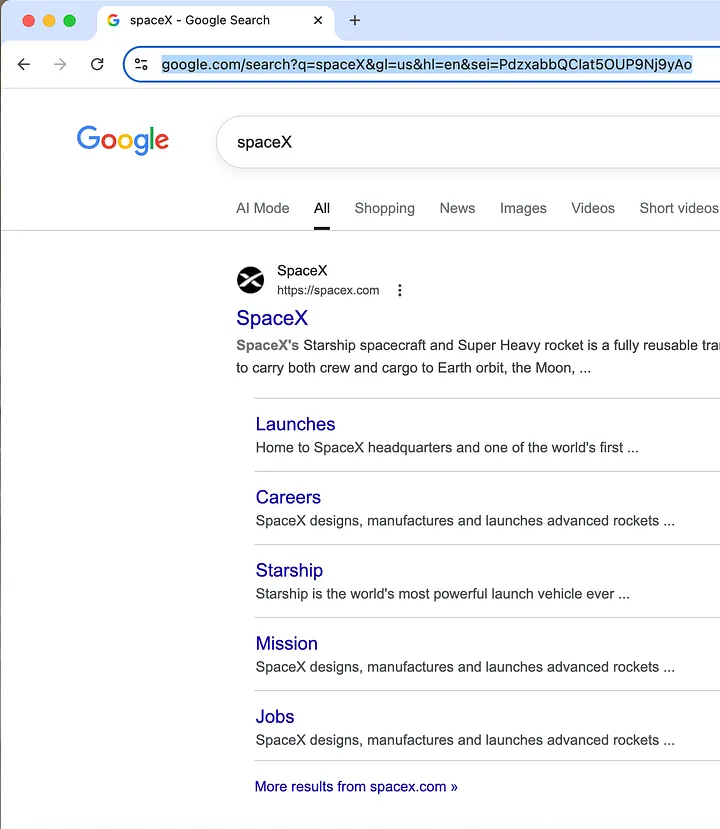
If you see this after running the code, then it means your Playwright setup is working.
Parsing with Cheerio
We will parse three things:
Title
Description
Link
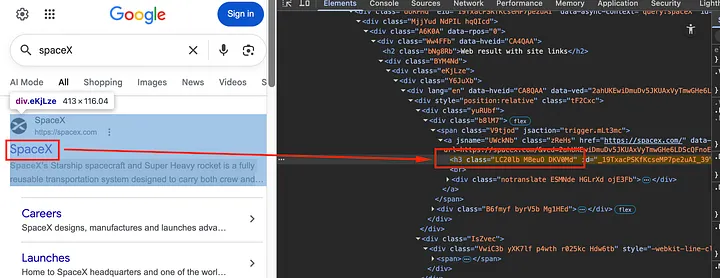
The title is wrapped inside the h3 element with the class LC20lb.

The description is wrapped inside the div tag with the class VwiC3b.
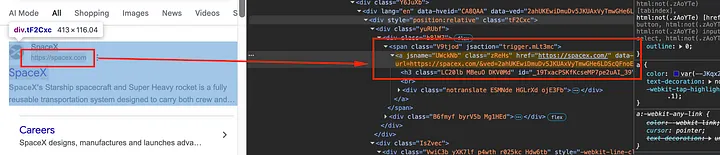
The link is wrapped inside a tag with the class zReHs.
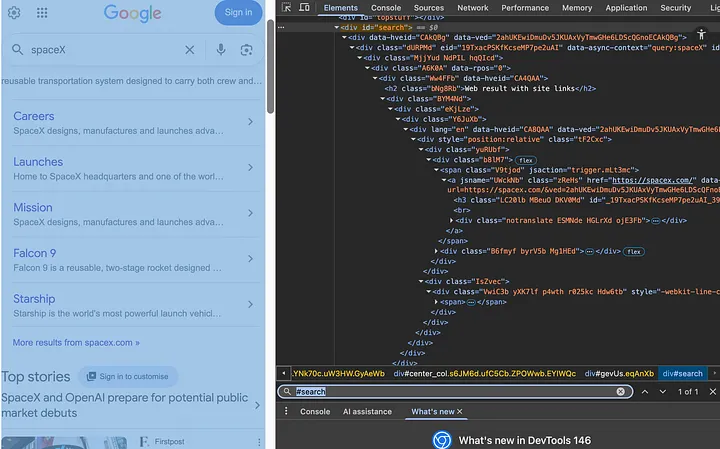
The entire page is wrapped inside a div container with id search.
According to the information gathered above, the Cheerio logic will be:
1const $ = cheerio.load(html);2 const results = [];3 4 $('#search .tF2Cxc').each((i, el) => {5 const title = $(el).find('h3.LC20lb').first().text();6 const link = $(el).find('a.zReHs').first().attr('href');7 const description = $(el).find('div.VwiC3b').first().text();8 9 if (title && link) {10 results.push({ title, link, description });11 }12 });13 14 return results;After running the complete code, you get this output:
1[2 {3 "title": "SpaceX",4 "link": "https://spacex.com/",5 "description": "SpaceX's Starship spacecraft and Super Heavy rocket is a fully reusable transportation system designed to carry both crew and cargo to Earth orbit, the Moon, ..."6 },7 {8 "title": "SpaceX",9 "link": "https://en.wikipedia.org/wiki/SpaceX",10 "description": "SpaceX was founded by Elon Musk in 2002 with a vision of decreasing the costs of space launches, paving the way to a self-sustaining colony on Mars. In 2008, ...Read more"11 },12 {13 "title": "SpaceX (@spacex) • Instagram photos and videos",14 "link": "https://www.instagram.com/spacex/",15 "description": "17M followers · 3 following · 996 posts · @spacex: "SpaceX designs, manufactures and launches the world's most advanced rockets and spacecraft""16 }17]Complete Code
1const { chromium } = require('playwright');2const cheerio = require('cheerio');3 4async function scrapeGoogleSearch(query) {5 const browser = await chromium.launch({6 headless: false,7 channel: 'chrome' 8 });9 10 const page = await browser.newPage();11 12 await page.setViewportSize({ width: 1920, height: 1080 });13 14 15 // Navigate to search results16 const searchUrl = `https://www.google.com/search?q=spaceX&gl=us&hl=en`;17 await page.goto(searchUrl, { waitUntil: 'domcontentloaded' });18 19 20 const html = await page.content();21 await browser.close();22 23 // Parse results with Cheerio24 const $ = cheerio.load(html);25 const results = [];26 27 $('div#search .tF2Cxc').each((i, el) => {28 const title = $(el).find('h3.LC20lb').first().text();29 const link = $(el).find('a.zReHs').first().attr('href');30 const description = $(el).find('div.VwiC3b').first().text();31 32 if (title && link) {33 results.push({ title, link, description });34 }35 });36 37 return results;38}39 40// Run41scrapeGoogleSearch('spaceX').then(results => {42 console.log(JSON.stringify(results, null, 2));43}).catch(console.error);Method 2: Scraping Google Search with Scrapingdog
The approach above works well if you’re scraping a few hundred pages. But once you scale to thousands or millions of pages, a Playwright + Cheerio setup starts to break down. Here, we’ll use a Google SERP API that handles the hard parts for us, including proxies, headers, and browser management.
Here, we will use Axios to make the GET request to the Scrapingdog’s Google SERP API.
Want to see the full workflow in action? Watch this video tutorial to learn how to Scrape Google Search Results with Node.js & Scrapingdog's Google SERP API
1const axios = require('axios');2 3async function scrapeGoogleSearch(query) {4 const response = await axios.get('https://api.scrapingdog.com/google', {5 params: {6 api_key: 'YOUR_API_KEY',7 query: query,8 results: 10,9 country: 'us',10 }11 });12 13 const results = response.data.organic_results.map(result => ({14 title: result.title,15 link: result.link,16 description: result.snippet17 }));18 19 return results;20}21 22scrapeGoogleSearch('web scraping tools').then(results => {23 console.log(JSON.stringify(results, null, 2));24}).catch(console.error);As you can see, with Scrapingdog, we only had to make a simple GET request. There was no need to manage a browser or write custom parsing logic. Running this code will produce a beautiful JSON response that contains every little detail, like Google Ads, AI overview, Video links, people also ask, etc.
1{2 "search_information": {3 "time_taken": 0.3,4 "total_results": 2110,5 "query_displayed": "spaceX",6 "organic_results_state": "Results for exact spelling",7 "original_query_yields_zero_results": false,8 "url": "https://www.google.com/search?q=spaceX&oq=spaceX&gl=us&hl=en&sourceid=chrome&ie=UTF-8"9 },10 "peopleAlsoAskedFor": [11 {12 "question": "Is SpaceX fully owned by Elon Musk?",13 "rank": 114 },15 {16 "question": "Can I buy stock in SpaceX?",17 "rank": 218 },19 {20 "question": "What is the real purpose of SpaceX?",21 "rank": 322 },23 {24 "question": "What's the average salary of a SpaceX employee?",25 "rank": 426 }27 ],28 "organic_results": [29 {30 "title": "SpaceX",31 "link": "https://spacex.com/",32 "displayed_link": "https://spacex.com",33 "favicon": "data:image/png;base64,iVBORw0KGgoAAAANSUhEUgAAABwAAAAcCAAAAABXZoBIAAAA10lEQVR4Ad2QIQiEQBBFfweDxXrNds1qsJoslu1mk71tEOxBMG41W8yb7WzcaBeEvRkXRLy7zt1LH97O/mHwO6TK4AvVsjkHhPXEdNEpgrgjs+uUc7c6QhdeRUVPatUlPJVma2VMWSh6us01ThLFdq2QK0thkSGuSOuMTHrDb4YMN0SbimXjbhHgnYHV3uMDpXGEzVKZ40Yodx5b0Fhnm9up/LYK2fH1EF+X0YdrAzx6y3EWp6t8XRP4ozrCSHjq9ZgT50G4fhufR984E9Nlx3qaiS7GH/ECeAedlKpi2RoAAAAASUVORK5CYII=",34 "source": "SpaceX",35 "snippet": "SpaceX's Starship spacecraft and Super Heavy rocket is a fully reusable transportation system designed to carry both crew and cargo to Earth orbit, the Moon, ...",36 "highlighted_keywords": [37 "SpaceX's"38 ],39 "extended_sitelinks": [40 {41 "title": "Launches",42 "link": "https://www.spacex.com/launches",43 "snippet": "Home to SpaceX headquarters and one of the world's first ..."44 },45 {46 "title": "Careers",47 "link": "https://www.spacex.com/careers",48 "snippet": "SpaceX designs, manufactures and launches advanced rockets ..."49 },50 {51 "title": "Mission",52 "link": "https://www.spacex.com/mission",53 "snippet": "SpaceX designs, manufactures and launches advanced rockets ..."54 },55 {56 "title": "Starship",57 "link": "https://www.spacex.com/vehicles/starship",58 "snippet": "Starship is the world's most powerful launch vehicle ever ..."59 },60 {61 "title": "Updates",62 "link": "https://www.spacex.com/updates",63 "snippet": "SpaceX designs, manufactures and launches advanced rockets ..."64 }65 ],66 "rank": 1,67 "page_rank": 168 },69 {70 "title": "SpaceX",71 "link": "https://en.wikipedia.org/wiki/SpaceX",72 "displayed_link": "https://en.wikipedia.org › wiki › SpaceX",73 "favicon": "data:image/png;base64,iVBORw0KGgoAAAANSUhEUgAAABwAAAAcCAAAAABXZoBIAAAAnklEQVR4AeTNIQiDQABG4b+u17X1aF6PK3YEO9iMJqPVau82y4FgMezS0oVLhqsHtrcqeqzDXv3CEz/6L4yTtZM3dnHmPTtjzXZAXKYVo4agkU2GI2Lloc6JDez1+flswMu1EQZ3xlE7lK8eKDkjtwE+crBMV+wesKmCiisGGepZIfQJpMj9SNb2MYWrChjVkULuCyCfRvsdmBieyQQAsoDk/9ryhFMAAAAASUVORK5CYII=",74 "source": "Wikipedia",75 "snippet": "SpaceX was founded by Elon Musk in 2002 with a vision of decreasing the costs of space launches, paving the way to a self-sustaining colony on Mars. In 2008, ...Read more",76 "highlighted_keywords": [77 "SpaceX"78 ],79 "rank": 2,80 "page_rank": 281 },82 {83 "title": "SpaceX (@spacex) • Instagram photos and videos",84 "link": "https://www.instagram.com/spacex/",85 "displayed_link": "17.1M+ followers",86 "favicon": "data:image/png;base64,iVBORw0KGgoAAAANSUhEUgAAABwAAAAcCAMAAABF0y+mAAABcVBMVEVHcEx3GPlwGPx1FvyDC/OWBumqA+K+AeDQANvVAs7rDa7jAtfoAMflAriKGP2ZCvunAvLEG/TgV9/oZt72G8nxB8nxALCKHPymGf7Pg/H86vf////zds79AcD9ALT3DZ30t+j63fP1st31quT8AKf8AJn98/jaO973Lr38AIvAAOz8Drn4V7370PHiGe34E6n7HZv9AHv5wOP1Wpr8D5H9AGz9GYX6q8r2YKL5dZP3tMT8D2/8KW31Y5f9AV/9Inn+G17+KFf3v879J0f+MUf5g2v3wbr9Nyz6RUP9Ml/9Qxr+SjX7zcr6Gkb8AEL+UQ/9Wiv98uT70rD8XQT8ZxD9ZCr40sP4Tn/9cAz+egj9ciX1km/1X1L9O0j4nD7+hAT9hRb8fh34unb9jQT3jZX73a78dwX+mwL6ymPzoZD8YSf9qAD+sQD7wBL8zEn5tV79jwb+uAD+vgH+wwD+LHP8owX+ygD6Olj7rQz+twf8UjMSMf5jAAAAe3RSTlMAW9L////////FW///2P///////////8b/////////xf///////////////////////////v/////////////////////////////////////////////////////////////////F////W////f//2f///9fY/9hbxcXA5ZvtAAACBUlEQVR4AUTPRaLkNhSF4f9IV3Kp/JjfCzMzM8xCG8lWMs9SsoIkTdNmZubiKtvqduMnZl0BkgCBEI+zhiBwD5f0ZA3wQj1Eu1YiMZQADyAA9SRXgpCEaGXcODFKoq/NEXRHXYmnshMak0xdGC/PiO1Mi1rTbA0LyM/BOOWyuISrHyLPTRoKZDaBndvoQrezQA/IWlBe6DXCsOdgong+bdCLyzW5F3VzpY7TckLH4ESRlvsbNlj2V4DNu3klk/Ed8HUvYlVKwa4NSmedWzNX1dbUcxlzsJMgxNppsywKv6l5M9YJZtizxOfObknxVOkVaAblle1BB0JNssXaJhA05tlKMOrcIXcMSOBc8IBvqzbQZC8SjIfMwxxz0iLnn0vQS+cx7ye0nPcPT7qPBmk2my7b4A0XlmiNzEMDQfD53vLF6sigLHLGMyzBCMzaawXf/HcAPqpmvqbDq5dGlQVjlexMYvqD0C3P+iVOccGBM0L1+d6uYozzRc6TbvA3/cI0r7g4dgoKy/SCee+akH32ltf38muG0kzR+PUfPl+DHq1in3jnSp8ZtjAxgz+u7OUJfb51cmk0Tqf158QwgcQUmM5zy9+tqnr9+nCf+3seU4hFCKHsptStxoEQg4fPhp7dP1dB8u6+LFzjqOq6afof/IWH/38O40irXXZ1g2+q99K9TWBgAACS27uoe/IOhgAAAABJRU5ErkJggg==",87 "source": "Instagram · spacex",88 "snippet": "17M followers · 3 following · 996 posts · @spacex: "SpaceX designs, manufactures and launches the world's most advanced rockets and spacecraft"",89 "highlighted_keywords": [90 "spacex",91 "SpaceX"92 ],93 "rank": 3,94 "page_rank": 395 },96 {97 "title": "SpaceX",98 "link": "https://www.youtube.com/spacex",99 "displayed_link": "6.8M+ followers",100 "favicon": "data:image/png;base64,iVBORw0KGgoAAAANSUhEUgAAABAAAAAQCAYAAAAf8/9hAAAAcElEQVR4AWP4//8/RZh6BgCZAkDsAMUNWDFCXgDFACCV8J/B+D8pGKwHRAKRAUyQDEMMQAYEUGBAAsiABpwKHjz4/9/BAZ8BDXgNgIMNGyg04MABkg1AeCEgAK8XKA5EiqORooSELykXEJuUBz43AgAIA1ZhBoG9vwAAAABJRU5ErkJggg==",101 "source": "YouTube · SpaceX",102 "snippet": "SpaceX designs, manufactures and launches the world's most advanced rockets and spacecraft. ...more SpaceX designs, manufactures and launches the world's ...Read more",103 "highlighted_keywords": [104 "SpaceX designs, manufactures and launches the world's most advanced rockets and spacecraft"105 ],106 "rank": 4,107 "page_rank": 4108 },109 {110 "title": "SpaceX (@SpaceX) / Posts / X",111 "link": "https://x.com/SpaceX",112 "displayed_link": "41.6M+ followers",113 "favicon": "data:image/png;base64,iVBORw0KGgoAAAANSUhEUgAAABwAAAAcCAAAAABXZoBIAAAA/0lEQVR4AbXPIazCMACE4d+L2qoZFEGSIGcRc/gJJB5XMzGJmK9EN0HMi+qaibkKVF1txdQe4g0YzPK5yyWXHL9TaPNQ89LojH87N1rbJcXkMF4Fk31UMrf34hm14KUeoQxGArALHTMuQD2cAWQfJXOpgTbksGr9ng8qluShJTPhyCdx63POg7rEim95ZyR68I1ggQpnCEGwyPicw6hZtPEGmnhkycqOio1zm6XuFtyw5XDXfGvuau0dXHzJp8pfBPuhIXO9ZK5ILUCdSvLYMpc6ASBtl3EaC97I4KaFaOCaBE9Zn5jUsVqR2vcTJZO1DdbGoZryVp94Ka/mQfE7f2T3df0WBhLDAAAAAElFTkSuQmCC",114 "source": "X · SpaceX",115 "snippet": "SpaceX (@SpaceX) - Posts - SpaceX designs, manufactures and launches the world's most advanced rockets and spacecraft | X (formerly Twitter)",116 "highlighted_keywords": [117 "SpaceX",118 "SpaceX",119 "SpaceX"120 ],121 "rank": 5,122 "page_rank": 5123 }124 ],125 "relatedSearches": [126 {127 "query": "Spacex news",128 "link": "https://www.google.com/search?gl=us&q=Spacex+news"129 },130 {131 "query": "Spacex falcon heavy launch",132 "link": "https://www.google.com/search?gl=us&q=Spacex+falcon+heavy+launch"133 },134 {135 "query": "SpaceX owner",136 "link": "https://www.google.com/search?gl=us&q=SpaceX+owner"137 },138 {139 "query": "SpaceX launch",140 "link": "https://www.google.com/search?gl=us&q=SpaceX+launch"141 },142 {143 "query": "SpaceX Starship",144 "link": "https://www.google.com/search?gl=us&q=SpaceX+Starship"145 },146 {147 "query": "SpaceX stock",148 "link": "https://www.google.com/search?gl=us&q=SpaceX+stock"149 },150 {151 "query": "SpaceX careers",152 "link": "https://www.google.com/search?gl=us&q=SpaceX+careers"153 },154 {155 "query": "SpaceX IPO",156 "link": "https://www.google.com/search?gl=us&q=SpaceX+IPO"157 }158 ] 159 160}How to Handle Pagination?
To scrape all the pages from Google, you can use the page parameter from Scrapingdog. You can read more about it in the documentation.
1async function scrapeMultiplePages(query, pages = 3) {2 const allResults = [];3 4 for (let i = 0; i < pages; i++) {5 const response = await axios.get('https://api.scrapingdog.com/google', {6 params: {7 api_key: 'YOUR_API_KEY',8 query: query,9 results: 10,10 country: 'us',11 page: i12 }13 });14 15 const results = response.data.organic_results.map(result => ({16 title: result.title,17 link: result.link,18 description: result.snippet19 }));20 21 allResults.push(...results);22 }23 24 return allResults;25}26 27scrapeMultiplePages('web scraping tools', 3).then(results => {28 console.log(`Total results: ${results.length}`);29 console.log(JSON.stringify(results, null, 2));30}).catch(console.error);With this approach, pagination is just incrementing the page parameter; no browser delays, no block risk, no extra complexity.
Parsing Different Result Types
The Scrapingdog API response contains much more than just organic results. Here’s how to parse each result type from the JSON:
1. Organic Result
1const organic = response.data.organic_results.map(result => ({2 rank: result.rank,3 title: result.title,4 link: result.link,5 snippet: result.snippet6}));7 8console.log('Organic Results:', organic);2. People Also Ask
1const paa = response.data.peopleAlsoAskedFor.map(item => ({2 rank: item.rank,3 question: item.question4}));5 6console.log('People Also Ask:', paa);3. Related Searches
1const related = response.data.relatedSearches.map(item => ({2 query: item.query,3 link: item.link4}));5 6console.log('Related Searches:', related);4. Sitelinks (only on top branded results)
1 const topResult = response.data.organic_results[0];2 3if (topResult.extended_sitelinks) {4 const sitelinks = topResult.extended_sitelinks.map(s => ({5 title: s.title,6 link: s.link,7 snippet: s.snippet8 }));9 console.log('Sitelinks:', sitelinks);10}5. Search Metadata
1const meta = response.data.search_information;2 3console.log(`Query: ${meta.query_displayed}`);4console.log(`Total Results: ${meta.total_results}`);5console.log(`Time Taken: ${meta.time_taken}s`);The advantage of the Scrapingdog API is that all these result types come back in a single structured response, no need to write separate CSS selectors for each one or worry about Google changing its DOM structure.
Export the scraped data to CSV
Node.js has a built-in fs module so no extra dependencies are needed for this step.
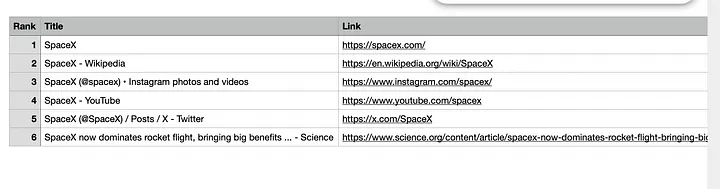
1const fs = require('fs');2const axios = require('axios');3 4function convertToCSV(results) {5 const headers = ['Rank', 'Title', 'Link', 'Snippet'];6 7 const rows = results.map(r => [8 r.rank,9 `"${r.title.replace(/"/g, '""')}"`,10 r.link,11 `"${r.snippet.replace(/"/g, '""')}"`12 ]);13 14 return [headers.join(','), ...rows.map(row => row.join(','))].join('\n');15}16 17async function scrapeAndExport(query) {18 const response = await axios.get('https://api.scrapingdog.com/google', {19 params: {20 api_key: 'YOUR_API_KEY',21 query: query,22 results: 10,23 country: 'us'24 }25 });26 27 const results = response.data.organic_results.map(r => ({28 rank: r.rank,29 title: r.title,30 link: r.link,31 snippet: r.snippet32 }));33 34 const csv = convertToCSV(results);35 const filename = `${query.replace(/\s+/g, '_')}_results.csv`;36 37 fs.writeFileSync(filename, csv, 'utf8');38 console.log(`Saved ${results.length} results to ${filename}`);39}40 41scrapeAndExport('spaceX').catch(console.error);Once you run this code, you will find a CSV file inside the folder.
Conclusion
In this guide, we covered two ways to scrape Google Search results with Node.js: Playwright and the Scrapingdog API. Playwright is good for low-volume testing and learning, but breaks easily at scale due to Google’s aggressive bot detection and frequent DOM changes.
For production use, the Scrapingdog’s Google SERP API is the clear winner. It handles proxies, CAPTCHA, and browser fingerprinting for you, returning clean, structured JSON with organic results, People Also Ask, sitelinks, and pagination in a single call, so you can focus on using the data rather than fighting to get it.
Frequently Asked Questions
Is scraping Google Search results legal?
Scraping public Google data is legal. For commercial use at scale, using an API like Scrapingdog is the safer route.
Why does my scraper get blocked so quickly?
Google detects bots through IP reputation, request frequency, and browser fingerprinting. Without proxy rotation and human-like behavior, even a few requests will trigger a block.
Can I scrape Google Search results for free?
Yes, using Playwright or Puppeteer, but you’ll hit blocks fast without proxies. Scrapingdog offers a free tier to get started without any infrastructure setup.
How many results can I scrape per page?
Google returns 10 results per page by default. You can paginate using the page parameter page=0 for page 1, page=1 for page 2, and so on.
Do I need to parse HTML when using the Scrapingdog API?
No. The API returns structured JSON directly, so there’s no need to write CSS selectors or worry about Google changing its DOM structure.