Scraping Home Depot isn’t straightforward. It uses JavaScript rendering, rate limiting, CAPTCHA challenges, and IP bans to block automated requests. You need the right tools and approach to collect data reliably at scale.
In this guide, you’ll learn how to scrape Home Depot using Python, from listing pages and product details to reviews and pagination, and export everything into a clean CSV file. You can also refer our guide on web scraping with python to learn scraping with python.
TL;DR
If you know the complete logic begind the scraping and parsing then you can just copy this code and use it.
					import requests
from bs4 import BeautifulSoup

response = requests.get(
    "https://api.scrapingdog.com/scrape",
    params={
        "api_key": "your-api-key",
        "url": "https://www.homedepot.com/p/RYOBI-ONE-18V-Lithium-Ion-2-0Ah-4-0Ah-Starter-Kit-with-1-2Ah-HP-Battery-1-4Ah-HP-Battery-and-Charger-PSK1212SB/339206615",
        "dynamic": "false"
    }
)
print(response.status_code)

obj={}
soup = BeautifulSoup(response.text, "html.parser")

# Title
title = soup.find("h1", class_="sui-line-clamp-unset")
obj["Title"] = title.get_text(strip=True)

# Price - dollar, cents in separate spans
price_parts = soup.find_all("span", class_="sui-font-display")[:3]
price = "".join([p.get_text(strip=True) for p in price_parts])
obj["Price"]=price

# Image - actual class in this page
img = soup.find("img", attrs={"data-testid": "small-image"})
obj["image"]=img["src"]

# Features
features_ul = soup.find("ul", class_="sui-text-base")
if features_ul:
    features = [li.get_text(strip=True) for li in features_ul.find_all("li")]
    obj["features"]=features

# Rating
rating_tag = soup.find("a", class_="sui-flex-row")
obj["Rating"]=rating_tag["title"]

print(obj)
Why Scrape Home Depot?
Home Depot has over 1 million products listed online, making it a valuable source for e-commerce data. Here’s what you can do with it:
- Price monitoring — Track price changes and adjust your pricing strategy.
- Competitor analysis — See how competing brands position and price their products.
- Inventory tracking — Monitor stock availability to spot supply gaps or demand surges.
- Review analysis — Collect customer feedback at scale to understand sentiment.
- Market research — Identify trending products and top-rated brands.
Requirements
To start with, you need Python installed on your machine. If you have not installed it, then you can download it from here. For this tutorial, we will require three libraries:
- requests — We will use this to make an HTTP connection with the Host website.
- BS4 — This will be used for parsing the data downloaded using requests.
- Pandas — This will be used to store data in a CSV file.
The final step would be to signup for a trial account of Scrapingdog. You will get 1000 free credits, which are enough for this tutorial.
Scraping Home Depot Product Page
For this tutorial, we are going to scrape this page from Home Depot. Create a Python file by any name you like. I am naming the file as home.py.
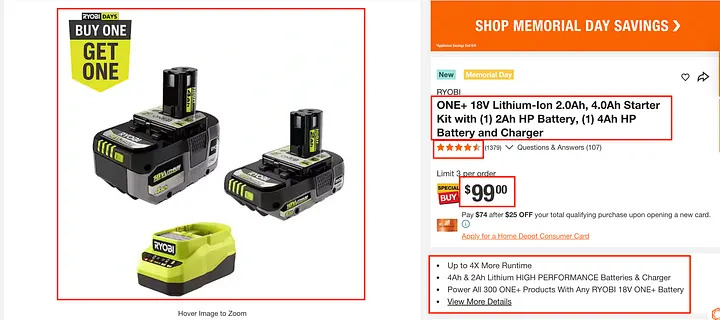
From the product page, we will scrape:
- Title
- Price
- Images
- Features
- Rating
Scraping Home Depot with Scrapingdog
					import requests

url = "https://api.scrapingdog.com/scrape"
params = {
    "api_key": "your-api-key",
    "url": "https://www.homedepot.com/p/RYOBI-ONE-18V-Lithium-Ion-2-0Ah-4-0Ah-Starter-Kit-with-1-2Ah-HP-Battery-1-4Ah-HP-Battery-and-Charger-PSK1212SB/339206615?MERCH=REC-_-rv_homepage_rr-_-n/a-_-0-_-n/a-_-n/a-_-n/a-_-n/a-_-n/a",
    "dynamic": "false"
}

response = requests.get(url, params=params)
print(response.status_code)
print(response.text)
Here we are making the GET request using requests to the scrape endpoint provided by Scrapingdog. Do not forget to pass your own private Scrapingdog’s key.
Let’s run this code.
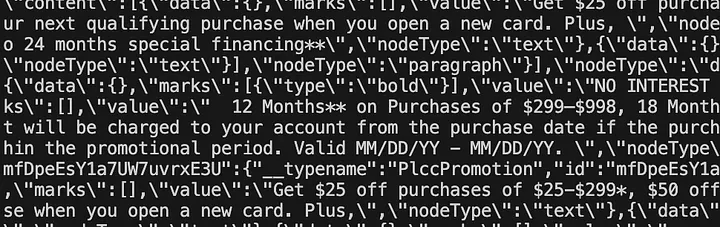
After running the code, you will get a 200 status code along with the HTML of the target page.
Now, we can use beautifulSoup to parse this data.
Parsing the required data with BeautifulSoup
Let’s start with the title. We have to find the DOM location of the title.

The title is wrapped inside a H1 tag with a class sui-line-clamp-unset.

The pricing is hidden inside the first three span tag with class sui-font-display.
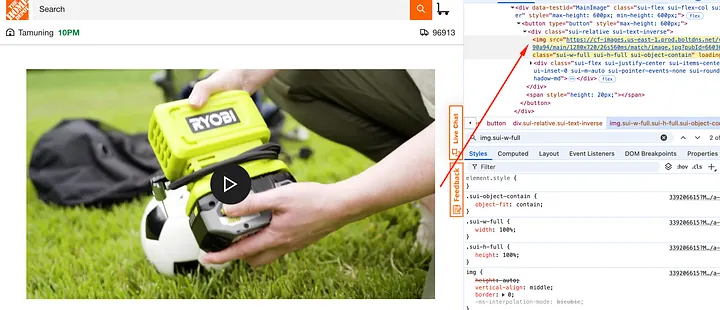
The product image is wrapped inside an img tag with class sui-w-full.
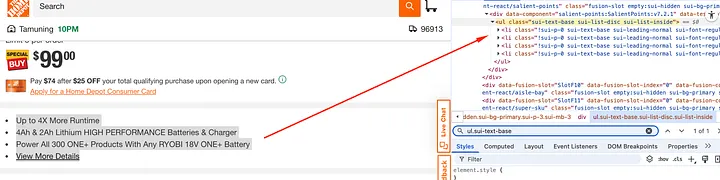
All the features of the product are located inside the ul tag with class sui-text-base.
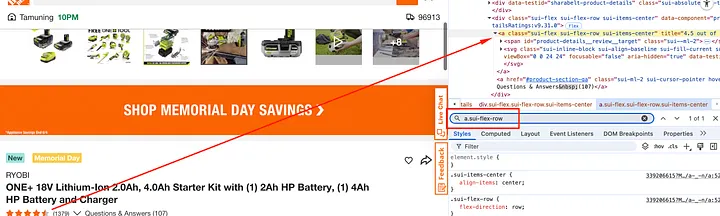
The rating of the product is wrapped inside a tag with class sui-flex-row.
Now, we have the DOM location of every data point we want to parse from the raw HTML. Let’s implement this logic with BS4.
					import requests
from bs4 import BeautifulSoup

response = requests.get(
    "https://api.scrapingdog.com/scrape",
    params={
        "api_key": "your-api-key",
        "url": "https://www.homedepot.com/p/RYOBI-ONE-18V-Lithium-Ion-2-0Ah-4-0Ah-Starter-Kit-with-1-2Ah-HP-Battery-1-4Ah-HP-Battery-and-Charger-PSK1212SB/339206615",
        "dynamic": "false"
    }
)
print(response.status_code)

obj={}
soup = BeautifulSoup(response.text, "html.parser")

# Title
title = soup.find("h1", class_="sui-line-clamp-unset")
obj["Title"] = title.get_text(strip=True)

# Price — dollar, cents in separate spans
price_parts = soup.find_all("span", class_="sui-font-display")[:3]
price = "".join([p.get_text(strip=True) for p in price_parts])
obj["Price"]=price

# Image — actual class in this page
img = soup.find("img", attrs={"data-testid": "small-image"})
obj["image"]=img["src"]

# Features
features_ul = soup.find("ul", class_="sui-text-base")
if features_ul:
    features = [li.get_text(strip=True) for li in features_ul.find_all("li")]
    obj["features"]=features

# Rating
rating_tag = soup.find("a", class_="sui-flex-row")
obj["Rating"]=rating_tag["title"]

print(obj)
Once you run this code you will get this beautiful parsed JSON data with all the details we were looking for.
{'Title': 'ONE+ 18V Lithium-Ion 2.0Ah, 4.0Ah Starter Kit with (1) 2Ah HP Battery, (1) 4Ah HP Battery and Charger', 'Price': '$9900', 'image': 'https://images.thdstatic.com/productImages/3f4be679-3a35-40e5-8935-f6876f66f03a/svn/ryobi-power-tool-batteries-psk1212sb-64_600.jpg', 'features': ['Up to 4X More Runtime', '4Ah & 2Ah Lithium HIGH PERFORMANCE Batteries & Charger', 'Power All 300 ONE+ Products With Any RYOBI 18V ONE+ Battery', 'View More Details'], 'Rating': '4.5 out of 5'}
Storing the data in a CSV file
					extracted_data.append(obj)

df = pd.DataFrame(extracted_data)
df.to_csv("home_depot.csv", index=False)
print("✅ Data saved to csv successfully.")
Appends each scraped product as a dict into a list, then converts that list into a pandas DataFrame and exports it as home_depot.csv. This will create a csv file inside your folder with the scraped data.
You can repeat this process in loop with the help of a for loop for various different products on homedepot.com.
FAQs
1. Is it legal to scrape Home Depot?
Scraping publicly available data is generally legal.
2. Does Home Depot block web scrapers?
Yes. It uses rate limiting, CAPTCHAs, IP bans, and JavaScript rendering to detect and block bots. That’s why you are recommended to use web scraping APIs like Scrapingdog.
3. Do I need a proxy to scrape Home Depot?
Yes. Rotating residential or ISP proxies are recommended to avoid IP bans at scale.
4. What data can I scrape from Home Depot?
Product names, prices, availability, ratings, reviews, specs, model numbers, and images.
5. Can I scrape Home Depot without JavaScript rendering?
No. Home Depot heavily relies on JavaScript to load product data, so you’ll need a headless browser or a scraping API.
6. How do I handle pagination when scraping Home Depot?
Increment the page offset parameter in the URL and loop through pages until no more results are returned.
Conclusion
Scraping Home Depot with Python gives you access to valuable product data at scale. In this guide, we covered everything from setting up your environment to extracting listings, product details, reviews, and handling pagination.
The biggest challenge is avoiding blocks, use rotating proxies and handle JavaScript rendering to stay undetected. If you want to skip the infrastructure hassle, Scrapingdog’s web scraping api handles all of that out of the box.
Happy scraping!