
Google Search API Documentation
Using the Google Search API, you can scrape Google search results without worrying about proxy rotation and data parsing. Each successful request costs 5 credits for standard search, or 10 credits for advanced search (advance_search=true) and mobile search (mob_search=true).
Endpoint:
https://api.scrapingdog.com/googleAPI Parameters
🔑
Authentication
api_keyRequiredYour personal API key. Available on your dashboard after signing up.
🔍
Search Query
queryRequiredThe parameter specifies the search query you want to execute, just like a standard Google search. Supports operators likeinurl:,site:, andintitle:.
Type: StringresultsDeprecatedGoogle no longer supports this option. Searches now return upto 10 results per page, and changing this parameter has no effect.pageOptionalThis is the page number of Google searches. Its value can be0for the first page,1for the second page, and so on. Default:0
Type: String
⚙
️ Scrapingdog Options
advance_searchOptionalThis can be used to get advanced feature snippets from Google. Iftrue, will cost 10 credits per request, otherwise 5. Default:false
Type: Booleanmob_searchOptionalUse this parameter to get mobile search results. Iftrue, it will cost 10 credits per request. Default:false
Type: BooleanhtmlOptionalThis will return the full HTML of the Google page. Default:false
Type: Booleandeep_scrapeOptionalFetches the content of the pages linked in theorganic_resultslinks, in addition to the search results. Only allowed whenadvance_search=false. Iftrue, costs 5 credits more per request. Default:false
Type: String
🌍
Geographic Location and Localization
domainOptionalTo obtain local results from a specific country, for example, for India it will begoogle.co.in, and for the UK it will begoogle.co.uk. Default:google.com. For a full list, see the Google Domains Page.
Type: StringcountryOptionalSpecifies the country for the Google search using a two-letter country code (e.g.,us,uk,fr). Default:us. For a full list, see the Google Country Parameter.
Type: StringlanguageOptionalLanguage of the results. Possible values:en,es,fr,de, etc. Default:en. For a full list, see the Google Language Page.
Type: StringlocationOptionalSpecifies the origin location of the search. Recommended at city level. Cannot be used with theuuleparameter.
Type: StringuuleOptionalSpecifies the geographic location or locale for which search results should be tailored (e.g.,w+CAIQIFJlbGF5IFN0YXRlcw==). Cannot be combined withlocation.
Type: StringcrOptionalAllows you to restrict the search to specific countries using formatcountryFRor multiple withcountryFR|countryDE. For a full list, see Supported Google Countries via cr parameter.
Type: StringlrOptionalLimit search to one or multiple languages using formatlang_enor multiple withlang_en|lang_fr. For a full list, see the Google LR Language Page.
Type: String
🔬
Advanced Filters
tbsOptionalAn advanced parameter to filter search results (e.g. time ranges, verbatim mode).
Type: StringsafeOptionalTo filter adult content set toactive, or to disable it set tooff. Default:off
Type: StringnfprOptionalExcludes results from auto-corrected misspelled queries. Set to1to exclude or0to include. Default:0
Type: StringfilterOptionalControls whether "Similar Results" and "Omitted Results" filters are enabled. Set to1(default) to activate or0to turn off.
Type: Boolean
🧠
Advanced Google Parameters
ludocidOptionalSpecifies the ID (CID) of the Google My Business listing, also referred to as the Google Place ID.
Type: StringlsigOptionalMay be required for knowledge graph map view. Obtain via Google Local API or Google My Business redirects.
Type: StringkgmidOptionalSpecifies the ID (KGMID) of the Google Knowledge Graph listing. May override other parameters exceptpageandresults.
Type: StringsiOptionalSpecifies cached search parameters of the Google Search you want to scrape. May override other parameters exceptpageandresults. Can be used to scrape Knowledge Graph tabs.
Type: StringibpOptionalControls rendering of specific layouts and expansion of certain elements (e.g.,gwp;0,7expandsludocidsearches).
Type: StringudsOptionalAllows filtering search results using a string provided by Google.
Type: String
API Examples
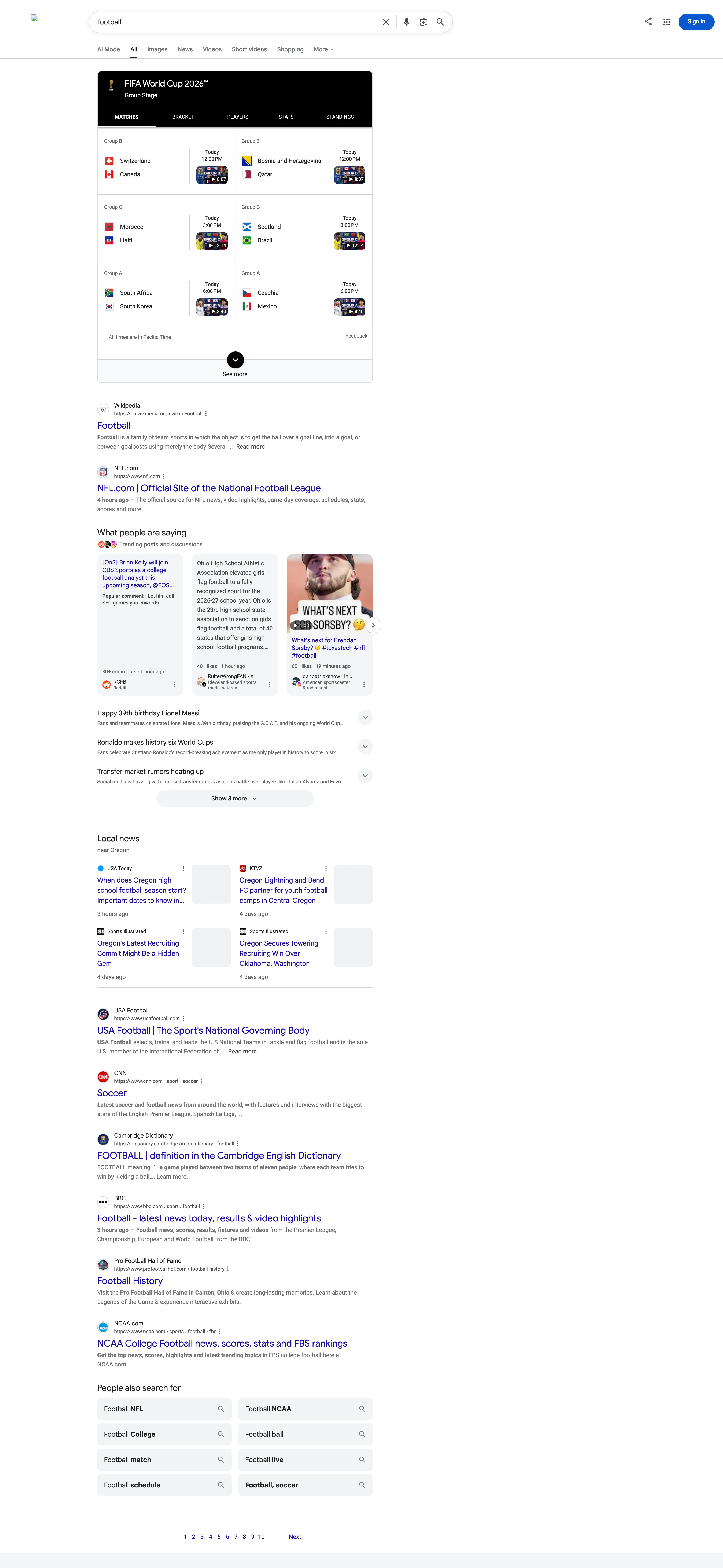
Code to Integrate
curl "https://api.scrapingdog.com/google/?api_key=APIKEY&query=football&results=10&country=us&page=0"
import requests

params = {
    "api_key": "APIKEY",
    "query": "football",
    "results": "10",
    "country": "us",
    "page": "0"
}

response = requests.get("https://api.scrapingdog.com/google/", params=params)

if response.status_code == 200:
    print(response.json())
else:
    print(f"Request failed with status code: {response.status_code}")
const axios = require('axios');

const params = {
  api_key: 'APIKEY',
  query: 'football',
  results: '10',
  country: 'us',
  page: '0',
};

axios.get('https://api.scrapingdog.com/google/', { params })
  .then((response) => {
    if (response.status === 200) console.log(response.data);
    else console.log('Request failed with status code: ' + response.status);
  })
  .catch((error) => console.error('Error:', error.message));
<?php
$url = 'https://api.scrapingdog.com/google/?' . http_build_query([
    'api_key' => 'APIKEY',
    'query'   => 'football',
    'results' => '10',
    'country' => 'us',
    'page'    => '0',
]);

$ch = curl_init($url);
curl_setopt($ch, CURLOPT_RETURNTRANSFER, true);
$response = curl_exec($ch);
echo $response === false ? 'cURL error: ' . curl_error($ch) : $response;
curl_close($ch);
require 'net/http'
require 'uri'

uri = URI.parse("https://api.scrapingdog.com/google/")
uri.query = URI.encode_www_form(
  'api_key' => 'APIKEY',
  'query'   => 'football',
  'results' => '10',
  'country' => 'us',
  'page'    => '0'
)

http = Net::HTTP.new(uri.host, uri.port)
http.use_ssl = true
response = http.request(Net::HTTP::Get.new(uri.request_uri))

puts response.is_a?(Net::HTTPSuccess) ? response.body : "Failed: #{response.code}"
import java.io.*;
import java.net.*;

public class Main {
    public static void main(String[] args) throws Exception {
        String url = "https://api.scrapingdog.com/google/"
            + "?api_key=APIKEY&query=football&results=10&country=us&page=0";

        HttpURLConnection conn = (HttpURLConnection) new URL(url).openConnection();
        conn.setRequestMethod("GET");

        if (conn.getResponseCode() == 200) {
            BufferedReader in = new BufferedReader(new InputStreamReader(conn.getInputStream()));
            String line; StringBuilder sb = new StringBuilder();
            while ((line = in.readLine()) != null) sb.append(line);
            in.close();
            System.out.println(sb);
        } else {
            System.out.println("Failed: " + conn.getResponseCode());
        }
        conn.disconnect();
    }
}
API Response
{
  "search_information": {
    "time_taken": 0.48,
    "total_results": 3690000,
    "query_displayed": "football",
    "organic_results_state": "Results for exact spelling",
    "url": "https://www.google.com/search?q=football&gl=us&hl=en"
  },
  "sports_results": {
    "title": "FIFA World Cup 2026™",
    "ranking": "Group Stage",
    "games": [
      { "tournament": "FIFA World Cup 2026™", "date": "Today", "time": "3:00 PM", "teams": [{ "name": "Switzerland" }, { "name": "Canada" }] },
      { "tournament": "FIFA World Cup 2026™", "date": "Today", "time": "6:00 PM", "teams": [{ "name": "Morocco" }, { "name": "Haiti" }] },
      { "tournament": "FIFA World Cup 2026™", "date": "Today", "time": "9:00 PM", "teams": [{ "name": "South Africa" }, { "name": "South Korea" }] }
    ]
  },
  "organic_results": [
    {
      "title": "Football",
      "link": "https://en.wikipedia.org/wiki/Football",
      "displayed_link": "https://en.wikipedia.org › wiki › Football",
      "source": "Wikipedia",
      "snippet": "Football is a family of team sports in which the object is to get the ball over a goal line...",
      "rank": 1
    },
    {
      "title": "NFL.com | Official Site of the National Football League",
      "link": "https://www.nfl.com/",
      "displayed_link": "https://www.nfl.com",
      "source": "NFL.com",
      "snippet": "The official source for NFL news, video highlights, game-day coverage, schedules, stats, scores and more.",
      "rank": 2
    },
    {
      "title": "FIFA | The Home of Football",
      "link": "https://www.fifa.com/",
      "displayed_link": "https://www.fifa.com",
      "source": "FIFA",
      "snippet": "The home of football across the globe, FIFA bring you the very latest tournament news, player exclusives and live match content.",
      "rank": 3
    }
  ],
  "relatedSearches": [
    { "query": "Football College", "link": "https://www.google.com/search?gl=us&q=Football+College" },
    { "query": "Football NFL",     "link": "https://www.google.com/search?gl=us&q=Football+NFL" },
    { "query": "Football live",    "link": "https://www.google.com/search?gl=us&q=Football+live" }
  ],
  "pagination": {
    "current": "1",
    "next": "https://www.google.com/search?q=football&gl=us&start=10",
    "page_no": { "2": "...", "3": "...", "4": "..." }
  },
  "scrapingdog_pagination": {
    "current": "1",
    "page_no": {
      "2": "https://api.scrapingdog.com/google?api_key=APIKEY&q=football&gl=us&page=10",
      "3": "https://api.scrapingdog.com/google?api_key=APIKEY&q=football&gl=us&page=20"
    }
  }
}